


Summary
Warehouse optimization software (WOS) is software that sits on top of your warehouse management system (WMS) and works out how the work should run: which orders go into one pick tour, the route through the aisles, which box or pallet each order needs, and where each SKU should be stored. The WMS still records the stock and sends tasks to the floor. The WOS calculates a better version of those tasks and passes it back, so the same team gets more done with the same WMS and no new hardware.
Most warehouses already run a WMS, and most managers suspect it leaves time on the floor. A WMS follows rules, and rules do not measure distance. Orders get grouped by order number or cut-off time, pickers walk a snake pattern through aisle after aisle, and a slot plan from three years ago still decides how far they walk today.
Warehouse optimization software is the layer that takes over those decisions. It plans the work, and the WMS still executes it, which is why the questions people ask about it are practical: does it replace the WMS, how does it connect, how is it different from a WES, and is it the same thing as automation?
What is warehouse optimization software?
Warehouse optimization software is a calculation engine for the decisions a WMS leaves to fixed rules. It takes the orders, stock locations, layout and item data from your systems, works through the possible combinations, and returns the option that costs the least walking, packaging, transport or space within your constraints.
The difference is in how many options get checked before a decision is made. A rule such as "batch the next 12 orders by order number" produces one answer and never looks at the alternatives. An optimizer compares many possible groupings and routes against trolley capacity, weight limits, cut-off times and one-way aisles, then keeps the cheapest one that respects all of them. The number of combinations grows quickly with every order you add, which is why this work does not fit in a spreadsheet or in a supervisor's head at 6 in the morning.
The decisions warehouse optimization software takes over
Most WOS tools work on the same four kinds of decisions. Each one is a decision your WMS already makes today, usually by rule:
- Picking: which orders go into one pick tour, and in which order the picker visits the locations.
- Packing: which box fits each order, and how cases stack onto a pallet within weight, height and do-not-stack rules.
- Slotting: which SKU goes in which location, based on how often it is picked and which items are ordered together.
- Planning: what a change would do before you make it, such as an extra cross-aisle, a different trolley or a re-slot before peak.
Item data belongs next to these four. An optimizer works with the dimensions and weights it is given, so if the item master says a carton is 30 cm long and it is really 40, the box choice and the pallet plan are wrong before anyone starts packing. That is why a WOS setup often includes a mobile tool to measure items on the floor. We list the seven warehouse processes that depend on item dimensions in a separate article.
What WOS means, and the terms it gets mixed up with
In logistics, WOS stands for warehouse optimization software. Outside logistics the same letters usually mean something else, such as the Web of Science research database. Inside the warehouse, the term most often confused with it is "warehouse operating system", which some vendors use for a platform that runs work across people, robots and automated equipment. That is closer to a warehouse execution system (WES) than to optimization software, and the next chapter puts the three side by side.
WOS vs WMS: what is the difference?
A WMS is the system of record, and warehouse optimization software is the system that calculates. The WMS knows which stock sits where, which orders are open and which tasks are done. It sends tasks to the scanners and keeps every move traceable. A WOS reads that same data, works out a better way to do the tasks, and hands the result back to the WMS to execute.
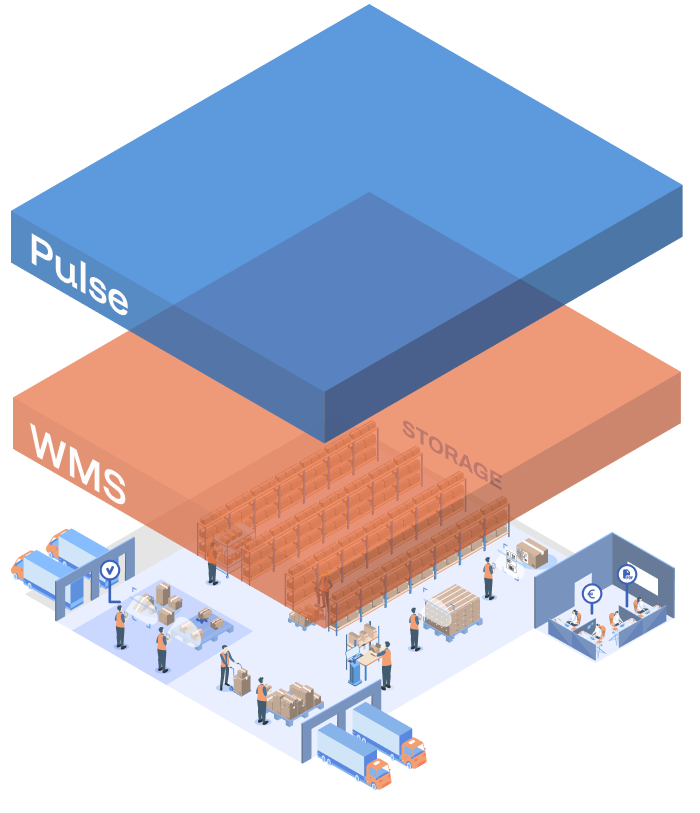
Pulse, our optimization platform, works this way. The WMS keeps running the floor, and Pulse plans the work it sends there, on top of SAP EWM and other WMSs. The illustration from our Pulse pages shows the arrangement as two layers over one warehouse.
Many automated sites run a third system in between. A warehouse execution system (WES) releases and balances work across people and machines as it happens, for example across conveyors, sorters and goods-to-person stations. Its job is to keep that equipment busy and in step with order cut-offs. The route a picker walks or the box an order goes into is usually decided somewhere else.
| WMS | WES | WOS (optimization software) | |
|---|---|---|---|
| Main job | Record stock, orders and tasks, and send tasks to the floor | Release and balance work across people and automated equipment | Calculate the cheapest batch, route, box, pallet or slot |
| Question it answers | Where is this SKU, and which tasks are open? | What runs next, and on which line or station? | What is the best way to do this work? |
| How it decides | Configured rules | Rules plus the live status of equipment | Algorithms that compare many options against your constraints |
| Replaces the others? | No, it is the core system | No, it runs next to the WMS | No, it runs on top of the WMS |
| Typical start | A core system project that touches every process | Usually part of an automation project | A test on your own order history, then a file or API connection |
View this comparison on desktop for the full data table.
Part of the confusion comes from WMS vendors that sell optimization as a module. A module inside the WMS ties the optimizer to that one WMS: if you want a better picking engine, you change WMS. A separate WOS works with whatever system you run, so a 3PL with different WMSs at two sites can use the same optimizer at both. If you are comparing tools, our guide to choosing warehouse optimization software lists what to check.
How does warehouse optimization software work?
Warehouse optimization software works in two modes on the same data. Operational optimization changes the work while it happens, and strategic optimization tests a change before you make it. Both rely on one digital model of your warehouse.
Operational: better tasks from the same WMS
The loop is data in, decision out. The WMS sends the open orders, stock locations and item data. The WOS groups the orders into tours, puts the picks of each tour in the shortest walking sequence through your layout, and sends the result back as pick lists that the WMS releases as usual. The picker scans the same labels on the same device; only the list is different.
Distance is the part a WMS cannot see. The optimizer needs a map of the floor: aisles, racks, cross-aisles, one-way rules and blocked zones, so it knows the real walking distance between any two locations. Without that map, systems fall back on snake-pattern picking routes that walk the aisles in a fixed order. The animation below, from our picking optimization page, runs a snake route and an optimized route over the same picks.
Bleckmann, a 3PL for fashion and lifestyle brands, cut walking distances by an average of 15 to 20% compared to non-optimised routes, with route sequencing working alongside its existing WMS to build a route for each pick list. The Bleckmann customer story describes the setup.
A MedTech distribution center shows the same pattern at a larger scale. Its 60 operators pick 30,000 order lines a day by hand, and picking productivity rose 27% after Pulse went on top of its WMS. Before, operators chose by hand which orders to combine, and the pick sequence followed a Z-shaped snake route. The first live step, clustering orders box-first onto the trolley, gave 15%, worth up to 9 FTE in manual picking. Six weeks later, with route optimization and double-stacked trolleys added, the total settled at 27%, and the operators kept doing the job the same way. The MedTech customer story and the video below go through the project.
Strategic: test the change before you make it
The same model of your warehouse doubles as a test bench. You load a few weeks of orders, change one thing in the model and compare the result with the as-is run: total walking distance, picks per hour and estimated hours. Continuous improvement engineers use it for questions such as adding a cross-aisle, turning a one-way aisle into a two-way aisle, buying a different trolley or re-slotting before peak. That is the job of a warehouse digital twin, and it puts a number on the business case before any money is spent.
How it connects to your WMS
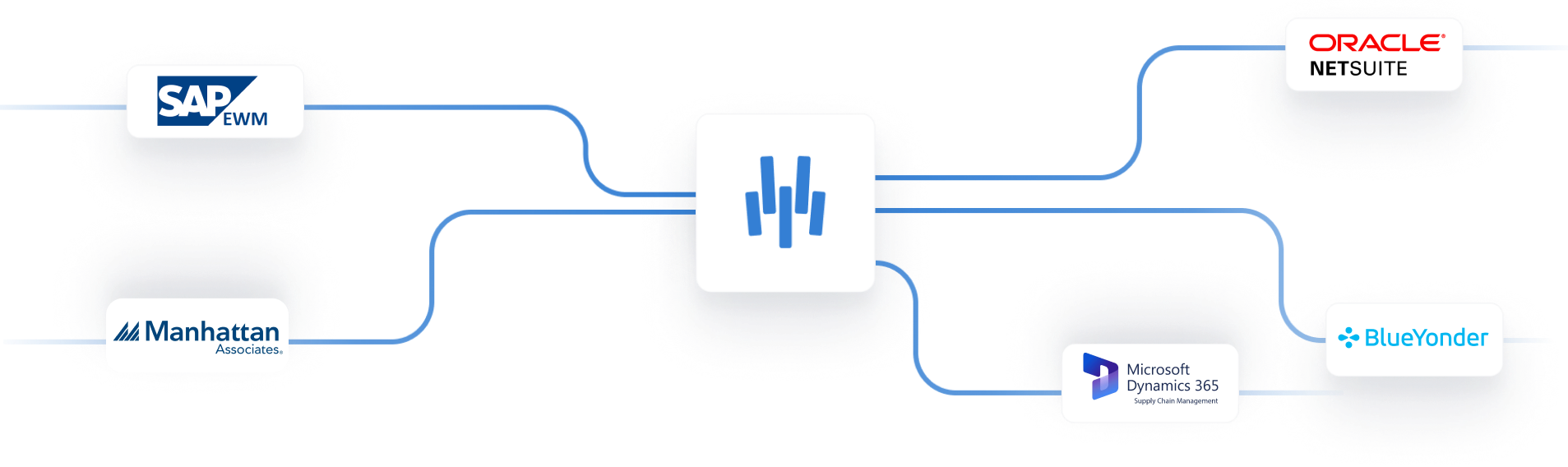
Pulse connects in one of three ways: file import and export, flat files over CSV or SFTP, or a direct API to the WMS, TMS or ERP. Many teams start with files on historical data to see the result, then move to an API for daily operation. Pre-built integration guides exist for SAP EWM and Microsoft Dynamics 365 Business Central.
What can warehouse optimization software optimize?
Warehouse optimization software covers picking, packing, slotting and the item data behind them. The gains are largest where people walk, pack and stack by hand, because that is where the WMS rule and the best option are furthest apart.
Picking
Order clustering and pick path optimization work best when they are solved together, because the best batch depends on the route and the best route depends on the batch. Across customer deployments, the general figure for Pulse is an up to 30% increase in pick rate, and walking distance drops by up to 50% when clustering, routing and slotting work together. Our article on warehouse picking optimization explains the methods one by one.
Packing: boxes and pallets
Cartonization chooses the box for each order before it is packed, from the item dimensions and the boxes you stock, so less air gets shipped and billed. Pallet building does the same for pallets: it predicts the pallet count when the order is entered and gives the team a step-by-step stacking plan that respects weight, height and do-not-stack rules. Across customer deployments, Pulse lowers transport cost by 10 to 30%.
Picking and pallet building can also be planned together, so cases come off the shelf in the order they go onto the pallet. With pick and stack combined, sites run with around 10% fewer pickers, across customer deployments. The palletization ROI calculator estimates what guided pallet building is worth in onboarding time, damage and rework for your own pallet volume.
Slotting
Slotting decides which SKU goes in which location, based on pick frequency and which items are ordered together. Most slot plans still come from static rules or an Excel heatmap and drift as demand shifts, and a perfect route through a badly slotted warehouse still covers ground it does not need to. Pulse treats slotting and routing as one problem: a scenario re-slots first and then routes across the new layout, so the two gains add up instead of working against each other.
Item data from the floor
Flux, our mobile data platform, captures the item data the optimizer depends on. Operators measure items and pallets with an iPhone 13 Pro or newer or an iPad Pro 2020 or newer, using the LiDAR sensor. Label scanning and digital checklists in the same app run on any iOS or Android device. The Flux product sheet lists the workflows it covers.
Warehouse automation vs optimization: how do they combine?
Automation changes the equipment, and optimization changes the decisions. Automation is hardware such as conveyors, sorters, shuttles, autonomous mobile robots (AMRs) and goods-to-person systems, which move goods or people so that people walk and carry less. Optimization is software that decides how the people, trolleys and racks you already have are used. The two are often presented as a choice, while in practice they go after different parts of the same labor cost.
Most warehouses are still largely manual. In the 2025 Automation Solutions Study by Peerless Research Group, 52% of companies said their order fulfillment was still mostly or all manual, up from 43% the year before, and only 4% said their picking was fully automated, as Logistics Management reported. On those floors, batching, routing and packing are decided by people and WMS rules on every shift.
Labor is what both approaches go after. US warehousing and storage paid an average of $26.74 an hour in August 2026, according to a preliminary figure from the US Bureau of Labor Statistics. Every hour of walking that a better batch or route takes out of a shift is an hour of that wage, before overhead.
Why optimize first
Automation sized on an unoptimized warehouse is sized on waste. If pickers walk a snake route and the slots have drifted, the business case for robots counts walking that software could have removed, and the equipment gets sized for it. Taking that waste out first gives a smaller and more accurate baseline. It is also cheaper to test, because software runs on the layout and order history you already have, with nothing installed on site.
For a site with a WMS, a mostly manual floor and pressure on labor cost, software is usually the faster first step. Our article on why 3PLs should optimize before they automate goes through the ROI math in more detail.
Where automation fits, and how the two work together
Automation pays back best where volume is high and steady: long shifts of similar orders and the same flows every day, with enough throughput to keep the equipment busy. Optimization keeps working on top of it there too. AMRs still need well-built batches and pick sequences, a goods-to-person station still needs orders grouped so the right totes arrive together, and a mixed pallet still needs a stacking plan, whether a person or a robot builds it.
Many sites end up with both, split by product. Small, fast-moving SKUs go into a goods-to-person system, while large or awkward items stay in manual picking, where slotting and route optimization do the work. Item dimensions measured on the floor feed both sides, because automated storage also needs to know whether an item fits the bin.
Each side has limits. With software alone, people still walk, pick and pack, only less, and the result depends on clean item data and a working connection to the WMS. Automation takes the walking out, but it fixes the layout and the flow for years, and a changing SKU mix or a new client can outgrow it.
For most mid-sized warehouses, the order is to fix the item data, optimize picking, packing and slotting in software, then automate the bottleneck that remains. A what-if run on your own orders shows how much of the gap software closes on its own, which is the number an automation business case should start from.
When does warehouse optimization software pay off?
Warehouse optimization software pays off where people walk, pack and stack by hand while the WMS decides by rule. These are the signs that the gap is large in your warehouse:
- Pickers walk the same snake route through the aisles, whatever is on the list.
- Orders are grouped by order number, carrier or cut-off time, and nobody checks which grouping walks least.
- Packers choose boxes by eye, and pallets leave half full or get restacked at the dock.
- The slot plan has not been reviewed since the last peak.
- New and temporary staff take weeks to reach normal pick rates.
- Layout and equipment changes are decided on gut feeling, because there is no way to test them first.
It fits less well in a few situations. Below roughly 10 pickers there is little walking to save. Sites already running goods-to-person automation have taken most of the walking out of picking. A simple layout with few path choices, or a team that already batches well by hand, will see the low end of every range.
How to start
- Export a few weeks of orders, item data and the location list from your WMS.
- Map the layout once: aisles, racks, cross-aisles and one-way rules.
- Run the as-is scenario and the optimized scenario on the same orders, and compare walking distance and picks per hour.
- Pilot in one zone or one shift through file exchange, then connect by API.
Steps 1 to 3 need no integration: Pulse runs them in its web app on uploaded data, so the business case is on the table before IT gets involved. For a quick estimate first, the order picking ROI calculator gives a yearly saving and payback time from four inputs, and the AI picking product sheet sums up how Pulse picking works on one page.
Questions?
In logistics and warehousing, WOS stands for warehouse optimization software. It is software that runs on top of a warehouse management system and calculates better pick batches, pick routes, box and pallet plans and slot plans. Outside logistics, WOS usually refers to something else, such as the Web of Science research database.
A WMS records stock, orders and tasks, and sends work to the floor using configured rules. Warehouse optimization software reads the same data, compares many possible ways to do the work, and sends the cheapest option back to the WMS. The WMS stays the system of record, and the WOS improves the decisions it executes.
No. Warehouse optimization software runs on top of the existing WMS and connects through file import and export, CSV or SFTP flat files, or an API. A MedTech distribution center added Pulse on top of its WMS and raised picking productivity by 27% without changing how its operators work.
No. Warehouse automation is hardware, such as conveyors, shuttles and mobile robots, that moves goods or people. Warehouse optimization software decides how the work is batched, routed, packed and slotted with the people and equipment you already have. Many warehouses optimize first and then automate the bottleneck that remains, and the optimization keeps running on top of the automation.
A first result can come from historical data before any integration: you upload orders and a layout and compare the as-is run with the optimized run. In live operation, a MedTech distribution center measured a 15% gain in picking productivity after its first optimized clustering, and 27% six weeks after route optimization and double-stacked trolleys were added.