


Summary
Pick and pack warehousing is the work of collecting the items on a customer order and packing them for shipment. Three decisions set most of its cost: which container the order goes into, which orders share a pick tour, and which route the picker walks. To optimize pick and pack operations, make those decisions in that order, before the picker leaves the start point. Pick-to-box and pick-to-pallet, where the picker fills the shipping box or the outbound pallet directly, only work when the container is known before the tour.
In most warehouses the two halves run as separate jobs. The WMS releases picking work in order-number or location sequence, and packing starts when the tote reaches the station. The packer then chooses a box by eye, with the items already on the bench.
Both halves cost money, and the picking half costs the most. A 2024 research paper by a team at Zalando on picker-to-parts warehouses puts order picking at more than 55% of total warehouse cost, with about 50% of a picker's time spent traveling between pick locations. The box decision is smaller per order, but it repeats on every shipment, as a restack, extra void fill or a higher dimensional weight charge.
Most of the fix is timing. A warehouse that decides the box at order release can pick into it, plan tours around it and route them, without changing the WMS or the floor.
What is pick and pack in a warehouse?
Pick and pack is the part of order fulfillment between a released order and a sealed shipment. A picker collects the order lines from their storage locations. The items then go into a shipping box or envelope, or onto a pallet, and the shipment is labelled and handed to the carrier.
The pick and pack process runs in three main ways. What separates them is the moment the shipping container is chosen.
Pick, then pack
Pickers collect items into totes or onto a trolley, and packers choose the box at a packing station. Many warehouses start here because nothing has to be decided upfront. The price is a second touch for every item and a box decision made by eye, under time pressure.
Pick-to-box
The picker puts items straight into the shipping carton during the tour. The box is chosen before the tour starts, so the packing station shrinks to a check, a label and a seal. It suits multi-line parcel orders of small and medium items.
Pick-to-pallet
The picker builds the outbound pallet while picking, usually on a pallet truck. Retail, wholesale and beverage distribution often work this way. Because the pallet grows in pick order, the pick sequence also decides whether heavy cases end up at the bottom. The article on mixed palletizing in pick and pack operations covers the stacking side.
| Flow | When the container is chosen | Touches per item | Fits | What to optimize |
|---|---|---|---|---|
| Pick, then pack | At the packing station | Two | Single-item orders, fragile goods, mixed item sizes | Tours and routes; box choice at the station |
| Pick-to-box | At order release, before the tour | One | Multi-line parcel orders of small and medium items | Box first, then tours that fit the trolley, then routes |
| Pick-to-pallet | At order release (pallet build plan) | One | Full-case store and wholesale orders | Build plan first, then a route in stacking order |
View this comparison on desktop for the full data table.
The picking method sits on top of these flows. Single-order, batch, cluster and zone picking all work with pick then pack. Pick-to-box with several cartons on one trolley is a form of cluster picking, with one carton per order. Our guide to warehouse picking strategies compares the methods.
Where pick and pack operations lose time and money
Each of the three decisions leaks in its own way, and in many warehouses nobody makes them on purpose.
Which container the order goes into
A box chosen by eye at the packing station tends to be too big. The packer has seconds per order and no way to check the fit in advance, and a box that turns out too small means unpacking and starting again. So the safe choice is the bigger box, and the difference ships as air and void fill. Kandula, Roy and Akartunali note in a 2024 study in Production and Operations Management that more than one quarter of the volume of a typical e-commerce package is air and filler.
Air also costs more on the parcel invoice than it used to. Since 18 August 2025, UPS and FedEx round every fractional dimension up to the next whole inch, as Value Added Resource reported. A box one size too big is billed on volume the order never needed.
Which orders share a pick tour
A WMS usually releases work in order-number or arrival sequence, so one tour can send a picker to both ends of the building while the next tour covers the same aisles again. Grouping orders whose lines sit close together cuts the number of trips. In pick-to-box the grouping has a hard limit: the cartons of every order on the tour have to fit on the trolley. The article on multi-order picking explains how those groups are formed.
The diagram below shows the idea on a small layout: the same picks, regrouped so each tour stays in its own part of the warehouse.
Which route the picker walks
Without a calculated route, pickers follow the location sequence or a fixed pattern, up one aisle and down the next. That covers aisles with nothing to pick and ignores cross-aisles and one-way rules. The guide on how warehouse picking optimization works goes deeper on routing and batching together.
The three decisions also pull against each other. A bigger box takes more trolley space, so fewer orders fit on one tour and the picker walks more per order. A route built only for distance can put light cases at the bottom of a pallet. When a different person makes each decision at a different moment, these conflicts never get resolved.
Signs your pick and pack process needs work
Most of the signs show up in data you already have: WMS pick confirmations, packing station records and carrier invoices.
- Tour lengths vary widely for tours with a similar number of picks, and the same aisles get visited by several tours in one shift.
- Packers regularly swap the box or repack an order after the first attempt did not fit.
- A large share of parcels is billed on dimensional weight instead of actual weight.
- In pick-to-pallet, pallets get restacked at the dock, or crushed cartons turn up under heavy cases.
- New pickers need weeks to reach the pace of experienced colleagues, because the good routes only exist in people's heads.
- Totes queue at the packing stations while pickers wait for the next wave.
Why it is hard to fix by hand
The decisions are combinatorial. With 200 open orders and a trolley that holds 12 cartons, the number of ways to split them into tours is far beyond what a planner can compare, and every split has its own best route. Add box sizes, weight limits, cut-off times and order priorities, and a rule of thumb is all a team has left. Rules of thumb work on an average day and break on a peak day, when the order mix changes.
The WMS records and directs the work, but it does not test alternatives. It assigns locations, releases waves and confirms picks. It does not calculate whether a different grouping or a different box would shorten tomorrow's walk. That gap is the reason optimization modules run on top of the WMS instead of replacing it.
The pick-to-box method: choose the box before the picker walks
Pick-to-box means the picker places each item straight into the shipping carton during the pick tour. The carton is chosen before the tour starts, travels on the trolley and leaves the aisle almost ready to seal. Some warehouses call it pick-to-carton. Each item is handled once instead of twice.
The picture below is how a planned order looks: the shipping box is chosen for the order, with a 3D plan of where each item goes, before the tour starts.
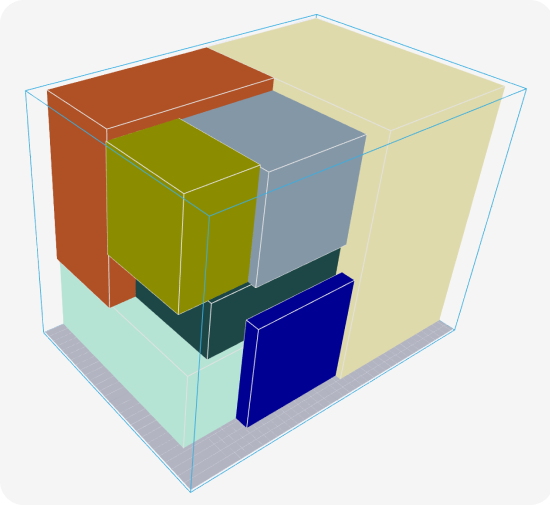
When pick-to-box fits
Pick-to-box pays off when orders have several lines of small to medium items and ship as parcels. E-commerce, spare parts and electrical wholesale fit this profile. It fits less well when most orders are single items, which go to a station anyway, or when items need protective packing that a picker cannot add on the trolley.
It also depends on reliable item dimensions and weights. If the item master says a product is 10 cm long and it is 14, the planned box will not close and the picker walks back for a bigger one. The article on why item dimensions matter covers what bad master data does to cartonization and the processes around it.
How cartonization decides the box before picking
When the order is released, cartonization software works out which box from your range fits the items, how they go in, and whether the order needs one box or two. Pulse does this on top of the WMS: the order goes in, and the answer comes back with the box type and the items for each box. In a pick-to-box flow the work then runs in this order:
- The WMS releases the order and sends it, with item dimensions and weights, to the cartonization engine.
- The engine tests the box range in 3D, item rotations included, and returns a box per order, or a split over two boxes when one would be too large or too heavy.
- Orders are grouped into tours so that their cartons fit on the trolley, and each tour gets its own route.
- The picker takes the empty cartons at the start of the tour and fills them along the route.
- At the end of the tour the cartons need a check, a label and a seal.
At Van Moer Logistics, order pickers know in advance which of the seven box types to take. Sophie De Vleeschauwer, Solution Design Manager, describes the loop: "Every order we receive, we first send it as an EDI message to Optioryx's system, after which we immediately receive a message back with information about which products to pack in which boxes." The Van Moer packing case describes the full setup.
Voltex was already picking directly to container before it worked with Optioryx; what changed is how the carton gets chosen. Alex Morton, Distribution Technology Lead at the Australian and New Zealand electrical accessories manufacturer: "When an order drops and it's ready to be picked and dispatched, it makes a call to Optioryx API and the response indicates which cartons to use, what items get placed in which cartons, and the picker and packer just follow those instructions." The Voltex customer story has the details.
The box choice also sets the transport bill. Across customer deployments, Pulse cartonization ships 15 to 30% less air and lowers transport cost by 10 to 30%, because every box option is scored against carrier rates as well as fill. The article on the benefits of cartonization breaks down where those savings come from.
Pick-to-pallet: pick in the order the pallet is built
In pick-to-pallet the route has two jobs: keep the walk short and build a stable pallet. A route planned only for distance can reach the light cases first, and then the heavy cases go on top of them. Good palletization practice puts heavy items at the bottom and light ones on top, because heavy cases on top crush the cartons below and make the load unstable in the truck.
Pulse generates the pick sequence to match the bottom-up stacking order, so heavy and large cases come first and the picker builds the pallet in the order it should stand. That removes the buffer step where picked cases wait to be restacked. On the screen the picker sees a 2D top view of the pallet with the position of every case, as in this short video of the guided instructions.
Route length and pallet stability pull in different directions, so the trade-off is worth measuring before go-live. The target is the shortest route that still builds a stable pallet. The gap between that route and a pure distance route shows what stability costs on your floor. Across customer deployments, optimized pick and stack runs with around 10% fewer pickers.
The pallet count is known before picking starts, because the build plan exists at order entry. Carriers get the count early, and the staging area can be planned for what is coming. To estimate what guided pallet building is worth on your volumes, the palletization ROI calculator works from your pallet throughput and team size.
How to optimize pick and pack operations, step by step
Optimize pick and pack in the order the work happens: item data first, then the container, the tour and the route, and measurement last.
- Fix the item data. Box and pallet plans need length, width, height and weight per SKU, so check the fast movers first.
- Choose a flow per order profile. Multi-line parcel orders suit pick-to-box, full-case store orders suit pick-to-pallet, and single items and fragile goods suit a packing station. Many warehouses run two flows side by side.
- Decide the container at order release. Cartonization or a pallet build plan assigns the box or pallet before the tour is built.
- Group orders into tours that fit the trolley, with its carton count, weight limit, cut-off times and priorities.
- Route each tour with your aisle rules: one-way aisles, cross-aisles and, for pallets, the stacking order.
- Measure before and after: walking distance per pick, picks per hour, repacks per 100 orders, and the share of parcels billed on dimensional weight.
Steps 3 to 5 can be tested on order history before anything changes on the floor. Pulse replays exported orders on a digital map of your warehouse and compares the planned tours and routes with the ones your team walked. The result is a business case built on your own layout, with no WMS integration needed for the test.
In operation, the optimization runs on top of the WMS, which stays in charge of stock and confirmations. Orders come in by flat file or API, and the box, tour and route go back the same way. Across customer deployments, the result is an up to 30% increase in pick rate. A MedTech distribution center that picks about 30,000 order lines a day with 60 operators increased picking productivity by 27%, and at go-live the operators noticed almost nothing: the trolleys were optimized in the background. The MedTech customer story explains how.
To put a number on it for your own site, the order picking ROI calculator turns four inputs into a yearly saving and a payback time: the yearly cost per FTE, orders per pick tour, the picking transport and the number of pickers. For a one-page summary of each side, download the AI picking overview or the 3D cartonization overview.
Questions?
Pick and pack is the fulfillment step where order lines are collected from their storage locations and packed into a box, an envelope or onto a pallet for shipping. Warehouses run it as pick then pack at a station, as pick-to-box straight into the shipping carton, or as pick-to-pallet. Picking is usually the largest labor cost in the step.
In pick then pack, items go into a tote and a packer chooses the box at a packing station. In pick-to-box, software chooses the box before the tour and the picker fills the shipping carton directly, so each item is handled once. Pick-to-box needs reliable item dimensions to work.
Make three decisions before the picker leaves: the container for each order, the orders that share a tour, and the route. Start with accurate item dimensions, assign boxes or pallet builds at order release, group orders into tours that fit the trolley, and route each tour with your aisle rules. Then track walking distance per pick and repacks per 100 orders.
Pick-to-box fits multi-line parcel orders of small and medium items. It is a weaker fit when most orders are single items, when items need protective packing a picker cannot add on the trolley, or when item dimensions in the WMS are unreliable, because the planned box will not close.
No. Optimization software such as Pulse by Optioryx runs on top of the existing WMS and exchanges orders and results by flat file or API. The WMS keeps managing stock and confirmations, and the optimization layer decides boxes, tours and routes. A MedTech distribution center increased picking productivity by 27% with Pulse picking on top of its existing WMS.