


Why Field Logistics Still Runs on Paper
Most logistics digitization efforts focus on the warehouse management system: inventory, orders, shipments.
What often gets overlooked is the edge of the operation: the moments where a worker is physically interacting with goods and needs to capture information on the spot.
These moments are everywhere: receiving a container and logging damage, reading a bill of lading and entering the data into the system, photographing a pallet before it goes out the door, running a compliance audit on hazardous goods.
Each one generates data. In most operations, that data gets captured inconsistently, if at all.
Research consistently finds that while digitization is a top priority for warehouse operators, the majority have yet to move beyond basic WMS to digitize floor-level workflows.
- A cargo inspection done on paper means transcription time later.
- A missed compliance field means a rework cycle.
- Photos shared via WhatsApp are stored nowhere and owned by nobody.
And when something goes wrong downstream, there's no audit trail to trace it back.
The gap isn't technology. Mobile devices are already on the floor.
The gap is structure: a way to guide workers through a consistent process, capture the right data at the right step, including reading it automatically from labels, documents, and barcodes, and send it somewhere useful without anyone having to retype it.
For a broader look at what digitizing warehouse work involves end to end, we've covered that separately.
The Top Use Cases for Mobile Data Capture in Field Logistics
1. Cargo Inspection
Cargo inspection is one of the highest-value use cases for mobile data capture. When goods arrive, the team needs to verify quantity, check for damage, confirm label accuracy, scan seal numbers, and document the condition of packaging. Done on paper, this process is slow and the output is unreliable.
Done with a structured mobile flow, it takes the same amount of time but produces a clean, timestamped record accessible immediately by anyone in the chain. A good mobile inspection flow walks the inspector through each step, prompts for photos at the right moments, uses AI scanning to read container numbers and license plates automatically, and flags anomalies in real time.
For teams handling inbound goods from multiple carriers and origins, the ability to capture consistent data across every inspection, regardless of who's doing it or which shift it is, is where the real value shows up.
2. 5S and 6S Workplace Audits
Research on 5S implementation in warehouses consistently shows meaningful productivity gains. One study found that time spent searching for items dropped by around 40% after introducing structured 5S practices. Most teams still run these audits with a printed checklist and a clipboard, meaning someone spends an afternoon collating results into a report after the fact.
Mobile audit flows cut that collation step entirely. The auditor works through the checklist on their device, attaches photos directly to the relevant items, adds notes where needed, and submits at the end. The report generates automatically. Results are visible to supervisors in real time, which means issues can be flagged before the next shift rather than the next week.
For 6S audits, mobile capture is especially useful: a safety concern spotted on the floor can be documented, photographed, and escalated within the same workflow, with a timestamp and location record attached. The no-code flow builder lets supervisors update audit criteria in minutes when standards change, without waiting for IT.
3. Container and Pallet Scanning
Container scanning involves capturing a lot of structured data quickly: container numbers, seal numbers, damage notes, temperature readings, quantity checks. When this is done manually, there's significant room for transcription errors and missing fields.
With a guided mobile flow, workers scan barcodes or QR codes where available. For data that can't be scanned, such as handwritten references, printed tables on delivery notes, or text on damaged labels, AI vision scanning reads numbers and extracts structured fields directly from the document or label. No manual typing required. The data feeds directly into the next step: a WMS update, a carrier notification, or a customs record.
Pallet scanning works similarly: capture the pallet ID, verify contents against the manifest, flag discrepancies, photograph damage. Structured fields don't allow typos in the container number format. Mandatory photo steps don't get skipped. Required fields don't get left blank.
4. Returns Handling and Product Assessment
Returns are a data-capture problem. When a returned item arrives, someone needs to assess its condition, determine the reason for return, decide its disposition (resell, refurbish, scrap, return to supplier), and document everything. In e-commerce fulfillment, this happens at volume and speed.
A mobile returns flow guides the worker through each decision point: Is the packaging intact? Is the product damaged? What's the reason code? Photo of the item. The output is a complete record that supports finance, quality, and supplier teams downstream. Without that record, returns management is largely guesswork.
5. Compliance and Hazardous Goods Checks
Handling hazardous materials requires documentation: verification of hazmat labels, expiry dates, handling instructions, storage conditions. This is an area where manual processes create real risk. A missed field on a compliance check isn't just an operational issue. It's a liability.
Warehousing regulations require facilities to maintain accurate hazard communication records and ensure safety data sheets are accessible to workers at all times. Requirements that are difficult to enforce consistently with paper-based systems.
Mobile compliance flows with AI label recognition automatically extract information from physical labels (flammable icons, UN numbers, expiry dates, handling instructions) and flag items that don't meet criteria for the intended shipment or storage zone. Workers get guided through the check step by step, without needing specialist training or manual cross-referencing.
6. Master Data Enrichment and Dimensioning
Accurate dimensional data is the foundation of several downstream processes: warehouse slotting, cartonization, and freight cost calculation. Most operations either have incomplete master data or rely on a fixed dimensioning station that handles high-throughput SKUs and nothing else.
Inaccurate dimensional master data is one of the top sources of freight surcharges and mispacked cartons. Errors that compound quietly across thousands of shipments.
Capturing dimensions on a mobile device fills that gap without additional hardware. A worker can measure a pallet or carton in 3–5 seconds, attach the data to the relevant SKU or order record, and move on. Static dimensioners cost €20–50K per station and are fixed in place. Flux works on Zebra handhelds, iPad Pro, and iPhone Pro models already in circulation. Over time, this builds a reliable dimensional dataset that feeds directly into optimized slotting and packing decisions in Pulse.
What Makes a Mobile Flow Actually Work in Practice
The use cases above are not new.
The problem has always been implementation. Building a custom mobile app for each workflow requires development resources that most logistics operations don't have.
Buying a pre-built tool means fitting your process into someone else's template. And deploying anything new to a floor team creates training overhead that supervisors want to minimize.
The tools that work well in practice share a few characteristics.
- They're guided: workers follow a defined sequence and can't miss a required step.
- They're flexible enough to handle variation: not every container is the same, not every return follows the same path.
- They work on the devices teams already have.
- They also need AI assistance where it removes friction.
Reading a document number by hand is slow and error-prone.
Having the device read it automatically is faster and more reliable. And they need to be fast to set up and change. A logistics operation that onboards a new client with specific inspection requirements needs to update its workflows without waiting weeks for a developer.
How to Build a Logistics Data Capture Flow in Flux
Flux is Optioryx's no-code mobile data gathering platform built specifically for this type of field logistics work. Here's how a typical flow gets built and deployed.
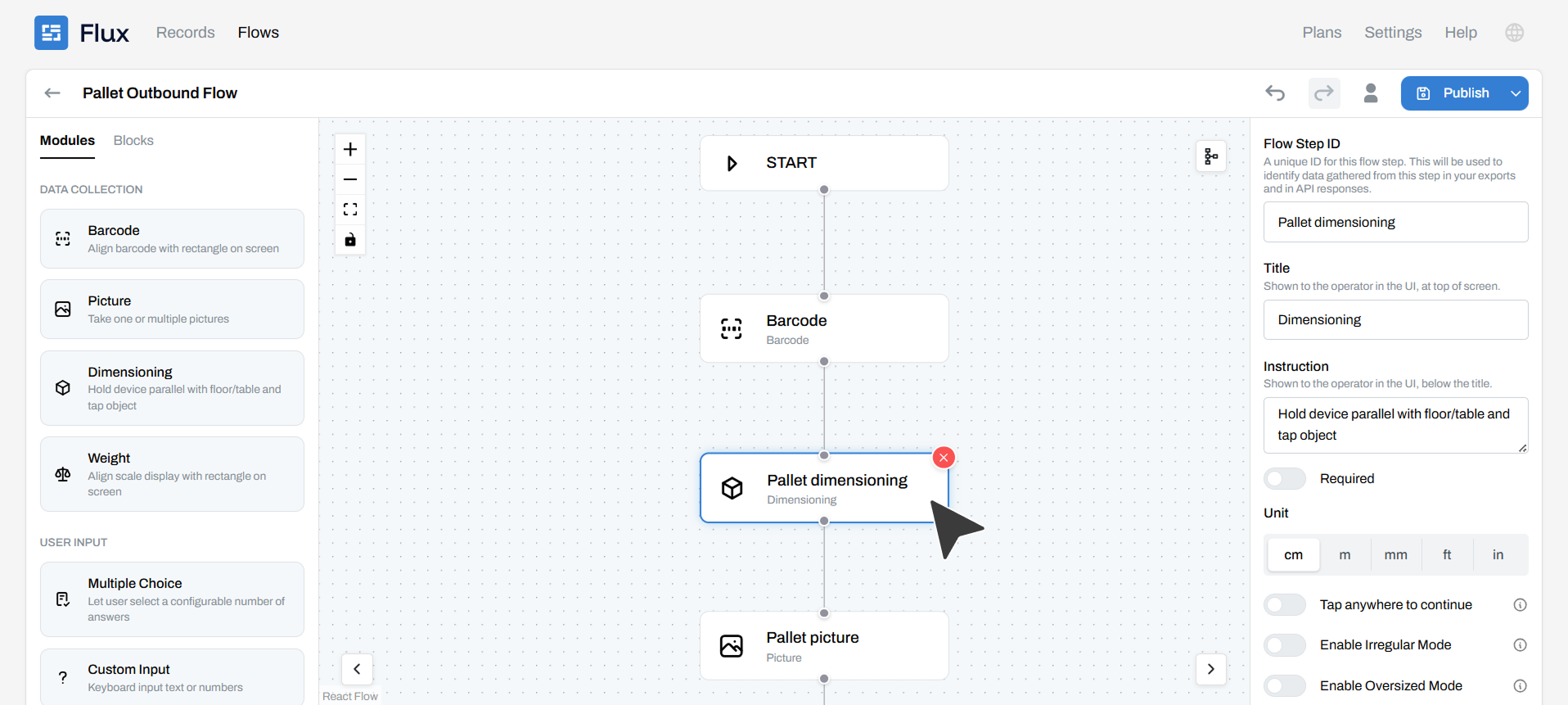
Step 1: Open the Flow Builder
Flux's flow builder is a drag-and-drop interface. You start with a blank flow or a template, then add the steps your workers will move through. Each step is a data capture module: a text field, a barcode scan, a photo prompt, a yes/no decision, a signature, a number input, a dropdown.
No code is required at any point.
A supervisor or operations manager can build a complete inspection flow in a few minutes, including field labels, required/optional settings, and conditional logic (for example, "if damage is reported, prompt for a photo before continuing").
Step 2: Add the Modules Your Process Needs
Flux includes a library of data capture modules beyond standard form fields. You can use simple checklists, custom inputs and also advanced AI modules such as mobile dimensioning, image classification or data extraction.
You can also customize each module in depth. How you want it configured, where in the flow it should be, what data points you want, units of measurement, etc.
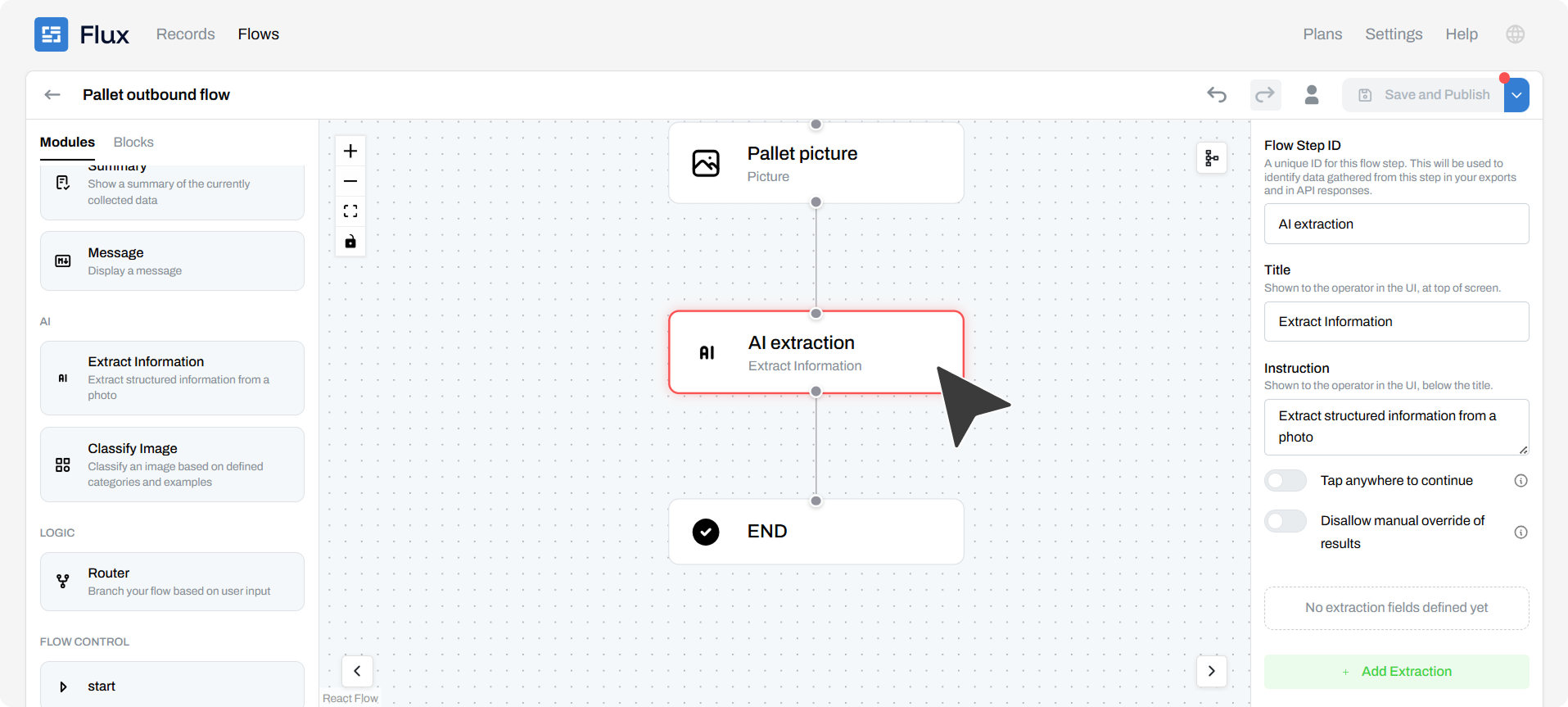
The ones most relevant for field logistics use cases include:
- Barcode and QR code scanning for container IDs, SKU codes, and pallet labels
- Photo capture with annotation support for damage documentation and condition assessment
- AI vision scanning: reads numbers and text from labels, documents, and forms automatically; extracts structured fields from bills of lading, delivery notes, and CMR documents without manual typing
- Hazard symbol recognition: automatically identifies flammable icons, DG classifications, expiry dates, and handling instructions from physical labels
- Dimensioning for capturing length, width, and height using the device camera, with automatic calculation of volume and weight class
- Checklist items for structured audit steps with pass/fail or scored responses
- Conditional branching so the flow adapts based on what the worker records. A damaged item triggers a different path than a clean one
Step 3: Assign the Flow to Your Team
Once the flow is built, you publish it to the Flux app.
Workers access it on their mobile device (Zebra handhelds, iPads, or any Android or iOS device) without downloading anything new. The flow appears in their app and they can start using it immediately.
Permissions control who sees which flows.
- A cargo inspector sees their inspection flows.
- A supervisor running a 6S audit sees the audit templates.
- A returns handler sees the returns assessment flow.
No one navigates through tools and processes that aren't relevant to their role.
Step 4: Collect and Use the Data
Every completed flow generates a structured data record.
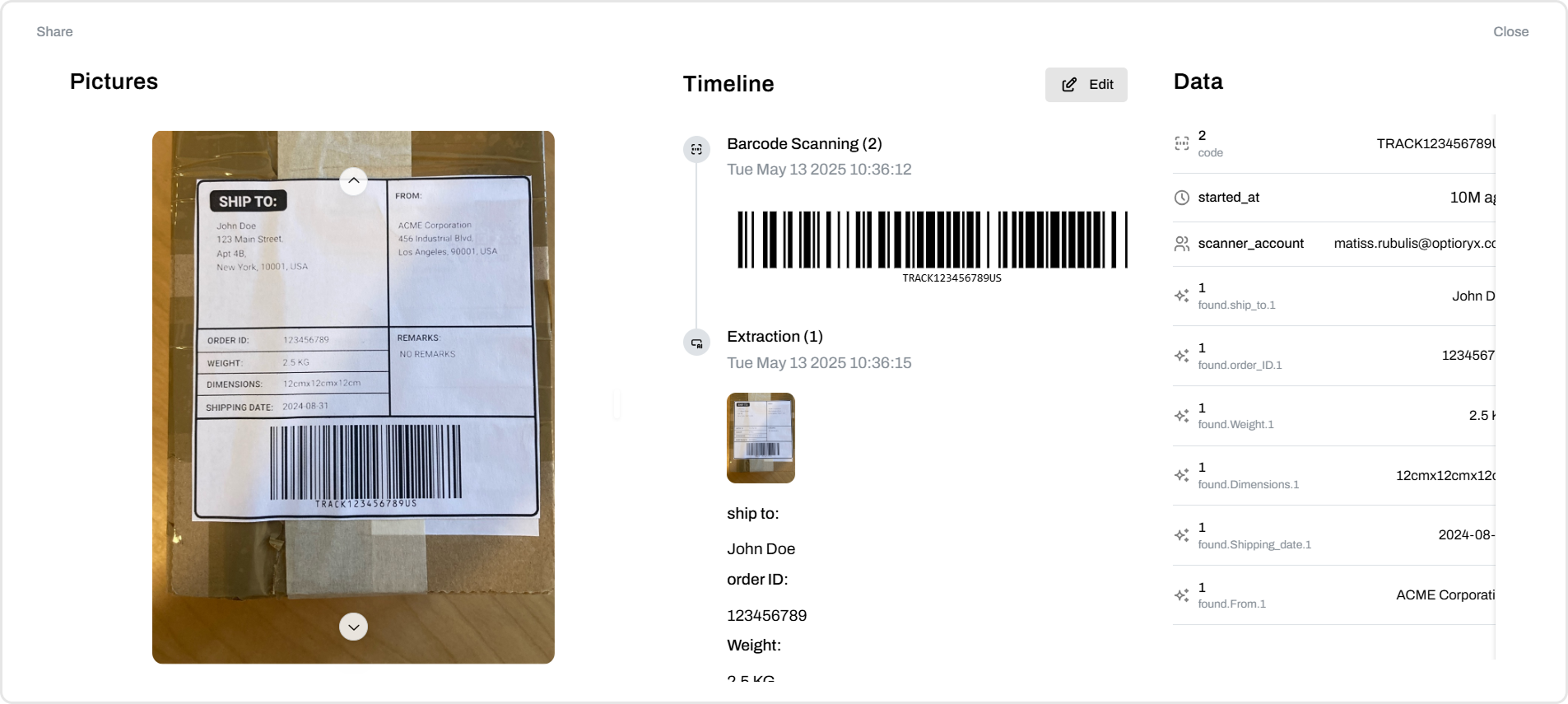
You can view results in the Flux dashboard, export to CSV, or connect to downstream systems via API.
Reports can be configured to send automatically when a flow is completed: an inspection report goes to the quality manager, a hazmat check goes to the compliance team, a damage record goes to the carrier claims process.
Because the data is structured from the point of capture, there's no cleaning step.
The inspection that took five minutes on the floor produces a complete, usable record instantly. And if it feeds into slotting or cartonization decisions downstream, the quality of those decisions improves accordingly.
Step 5: Iterate as Your Process Changes
This is where the no-code approach pays off over time.
When a process changes, say a new client requires an additional inspection field, a regulatory update adds a compliance step, or a team finds that one question is consistently confusing, you update the flow in the builder and republish.
The change is live within minutes.
No developer, no ticket, no waiting. Operations running multiple client accounts can maintain separate flows for each client's requirements, all managed in the same place, without any two clients seeing each other's processes.
Getting Started
Flux has a free tier that lets you build and deploy flows without any upfront commitment.
Most teams start with one use case, usually the inspection or audit process causing the most friction, build a flow, run it with a small group, and expand from there.
The setup time is measured in hours, not weeks. The first flow tends to show results immediately, simply because workers are capturing data consistently for the first time. From there, the pattern usually repeats: identify the next paper-based process, build the flow, replace the clipboard.
If your field team is still sharing photos on WhatsApp and re-entering data from forms, the problem isn't the people. It's the tools.
Structured mobile data capture doesn't require a big technology project. It requires the right platform and one use case to start with.
Questions?
Two parts. A mobile app your team uses on the floor, and a web app where you build flows, manage users and share reports.
Flux uses LiDAR laser technology available on compatible iOS and Android devices. This allows you to scan items and capture dimensions with high accuracy on the go.
Static dimensioners are fixed to one location, require special hardware, and need a dedicated station. Mobile solution works on supported phones or tablets, enabling accurate item measurements anywhere