


Summary
Warehouse slotting optimization is deciding which SKU sits in which pick location, so the warehouse picks with the least walking, waiting and handling. ABC slotting, which gives the fastest movers the best locations, covers the biggest driver of travel. A full slotting optimization also weighs congestion, ergonomics, weight, items ordered together, fill rate and compliance, and those goals pull against each other.
The output that helps on the floor is a ranked list of moves, small enough to carry out in a shift. There are four ways to act on it: re-slot a capped number of moves at the end of a shift, run a full re-slot, choose locations during replenishment, and housekeep the locations themselves. Only the full re-slot is a project.
Most slot plans were right when they were made. The order profile they were built on keeps moving, so a plan starts to drift the week it goes live, and the drift shows worst in peak season, when the busiest aisles get busier still.
For the definition and the basics, start with what warehouse slotting is.
What warehouse slotting optimization weighs
Order picking is where slotting pays off. A 2025 case study in Applied Sciences puts order picking at 50 to 75% of total warehouse operating costs and nearly 55% of labor time. In a five-week trial in an edible oil plant's warehouse, the same study found that storage allocation had a stronger influence on picking efficiency than routing decisions.
ABC slotting and where it stops
ABC slotting ranks SKUs by pick frequency and gives the A items the locations closest to dispatch, at grab height. B and C items move further out. It is the right first cut, because the number of visits to a location drives most of the walking.
Many warehouses run ABC and nothing else. ABC says nothing about cube, weight, expiry or which items ship together, and it concentrates demand: put every A item in the first two aisles and the walk gets shorter while those aisles fill up with pickers.
The animation shows the first step on its own: the same racks with fast movers scattered across the building, then pulled up front.
Illustration from the Pulse slotting page: the same racks before and after fast movers are sorted toward the front. Blue marks slow movers, orange marks fast movers.
The eight objectives a slot plan balances
A full slotting optimization weighs eight objectives, and compliance is a hard rule that comes first. The other seven are weights you set:
- Travel distance: fast movers, and items ordered together, close to where the pick tour starts and ends.
- Congestion: fast movers spread over more aisles, so pickers do not queue in one spot.
- Ergonomics: fast movers at grab height and heavy items at a safe lifting height.
- Stackability: items that can carry weight picked before fragile ones, which ties them to the early stops on the route.
- Poka-yoke: look-alike SKUs kept apart, so a picker under time pressure does not grab the wrong one.
- Category grouping: one product family per zone.
- Fill rate: items in locations close to their own size.
- Compliance: zone tags, weight limits per level, sprinkler zones for flammables, temperature zones and hazmat kept away from food.
How warehouse slotting algorithms score a move
Warehouse slotting algorithms turn those objectives into a cost for every pair of SKU and location. The core term is pick frequency times travel distance, summed over all SKUs. On top of that come a cost for separating items that ship together and a large penalty for breaking a compliance rule.
At warehouse scale the problem is NP-hard, so tools solve it with heuristics. The mathematical form, and what each classic storage rule is worth, is in our explainer on the storage location assignment problem.
In Pulse, the score starts from where every SKU sits today, so leaving an item where it is counts as a valid answer. A move only makes the list when it saves more than it costs.
When a slot plan stops fitting
A slot plan is decided once and then changed in small ways every day. Each new SKU and each replenishment puts an item somewhere, usually in whatever location is free. The big decision gets made again only when someone schedules a re-slot.
Plans decay on their own. A plan fits the order profile of the period it was built on. New SKUs, promotions and seasonal items shift which locations get visited, and the analysis rarely gets re-run until picks per hour have already dropped.
Peak season
Peak is where a plan built for a normal week breaks first. An item that moves as a C item in June can be one of your top lines in November. Moving stock takes shifts, so slotting for peak belongs in September, before the volume arrives.
We went through the most common errors in the 6 slotting mistakes warehouses make before peak. The weighting that works in a normal week is the wrong one at peak volume, because congestion starts to cost more than distance.
Slotting analysis: how to tell if your slotting needs work
Slotting quality erodes slowly, so the signs are easier to find in how slotting is done than in the KPIs. These are the patterns we see most often:
- Slotting was done once and not since, so the plan fits the order profile of the year it was built.
- Every SKU has a fixed home that stays reserved, even after the item stops selling.
- The slotting is ABC and nothing else.
- The plan lives in an Excel sheet that one person owns and rebuilds by hand, about once a year.
- The WMS assigns locations without a map of the real layout. It sees a legal empty bin of the right size, and nothing about the walk to reach it.
- New SKUs go to whatever location is free at receiving, because the WMS has no better rule.
- Nothing changes before or after peak season.
- Items that ship in the same order sit in different aisles, so one order walks the building.
Reading a pick heatmap
A pick heatmap colors every location by how often it is picked. Dark means high pick density and light means low. A healthy pattern is dark near dispatch and fades outward.
Three patterns point to a problem. Dark cells in far zones mean fast movers sit where they cost the most to reach. Light cells in prime locations mean golden-zone space goes to items that do not earn it.
Dark cells stacked in one aisle mean velocity was optimized without congestion. The walk got shorter and pickers now wait for each other. On paper that plan looks right, which is why it gets missed.
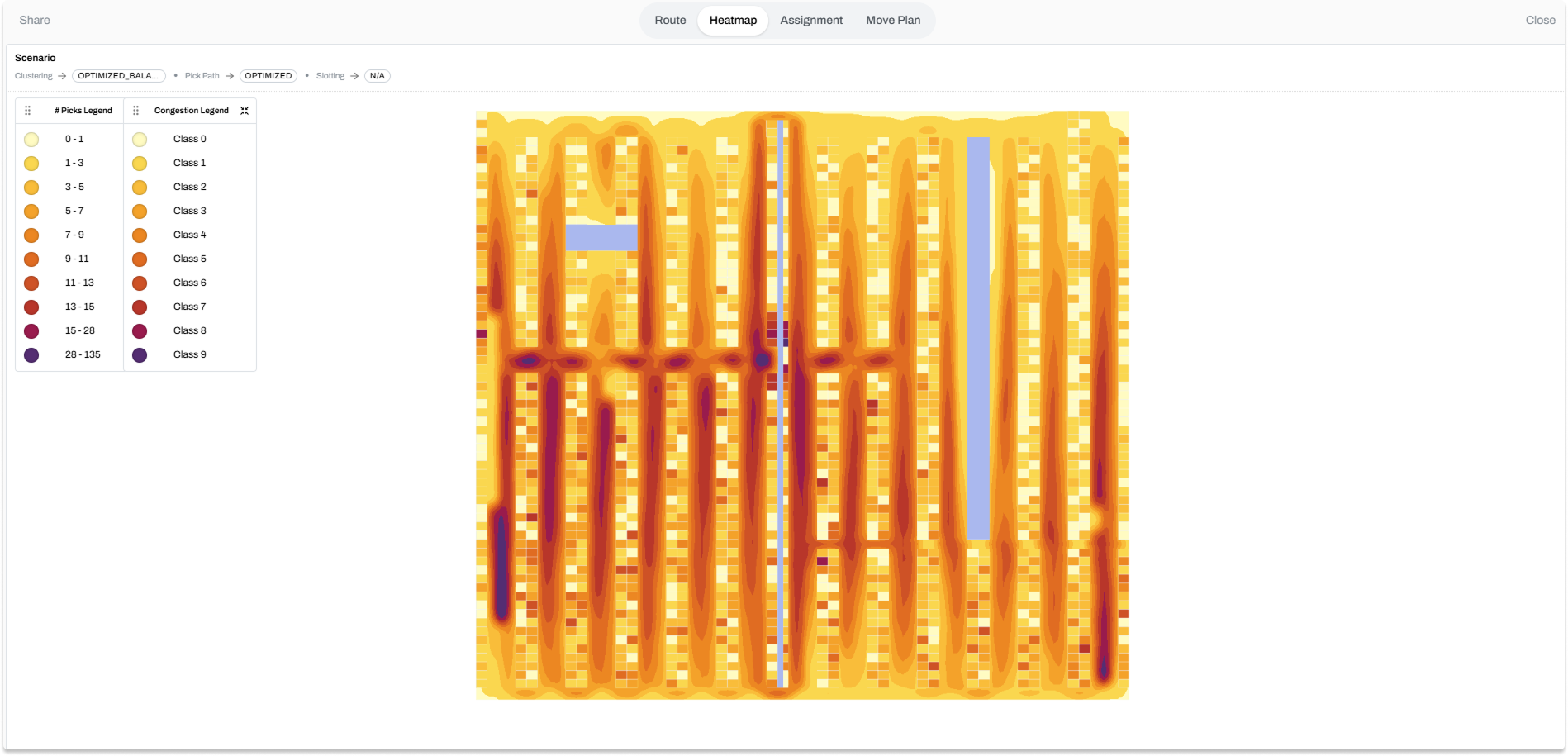
The waiting is measurable. A 2026 study in the International Journal of Production Economics analyzed 490,398 pick events in the warehouse of a German retailer. When another picker blocked the pick face, the pick took about 9.4% longer, and the authors note that concentrating high-demand products near the depot can create traffic hotspots.
Why slotting optimization is a trade-off
Every slotting objective has a cost, and the cost usually lands on another objective. Push travel distance to its limit and pickers crowd into the same aisles. Group by product family for accuracy and look-alike items end up side by side, which is where mispicks come from.
No assignment wins on every objective. What an analysis can show is where your current plan sits, and which trade it makes without anyone having chosen it. In the radar below, pick one objective and watch the other seven move.
A tool that hands you a slot plan without saying which objective it weighted highest is hiding the choice. The weights are a business decision, and they change with the season.
The weights change in peak
Once volumes climb and more pickers work the same aisles, waiting starts to cost more than walking. Congestion and replenishment effort move up the list and walk distance moves down. Compliance stays on top all year.
Volume also raises pick density, which works the other way. More lines per batch means a shorter walk per pick, so productivity can hold up while the aisles get busier. Which effect wins depends on your layout and order profile, and both effects are non-linear and interact, so a spreadsheet cannot settle it.
Bart works through which objectives to re-weight, and in what order, in how to slot a warehouse to avoid congestion during peak season.
4 ways to improve your slotting
A full re-slot is the version most people picture, and it is one of four ways to improve a slot plan. The other three run inside normal operations, which is why most sites start with them.
1. Re-slotting
Every possible move is ranked by how much walking it saves, and only the top 5, 10, 50 or 100 make the list. One operator walks that list at the end of a shift. Next week the list is rebuilt against fresh order data.
A ranked list of ten moves is a job, while a re-slot is a project, and projects wait for a quarter that never comes. The cap is what turns slotting into a weekly habit.
The chart shows how picks per hour respond as the number of end-of-shift moves grows.
The first moves do most of the work. In a typical deployment, twenty moves add about 5% to picks per hour and sixty about 10.5%, after which the curve flattens. Capping the list costs little, because the moves left out are the ones worth least.
2. Full re-slot
Every SKU gets its best location assigned from scratch, based on order history. Nothing is held fixed, so this action has the most room to change things. It also needs a shutdown window or a quiet week to carry out.
A full re-slot keeps its value only when ongoing re-slotting follows it. A plan built on one quarter's orders drifts as soon as the order profile moves, and left alone it starts losing ground the day it goes live.
3. In replenishment
Every inbound item is a slotting decision. When a SKU comes in, it gets the best open location, weighted by how fast it sells and what it ships with. The labor to put it away is spent either way, so the only question is whether the location was chosen or simply accepted.
4. SKU housekeeping
Housekeeping works on the locations themselves. A slow mover spread across three pallet positions, each holding a few cartons, can be merged into one, which gives two positions back.
A fast mover in one lane runs dry twice a shift. Split it across two lanes and it runs dry once. Merging buys space, and splitting buys time.
All four need the same thing underneath: a scored list of moves, built on your own order history and layout.
Simulate the gain before you move stock
Warehouse slotting optimization software runs the analysis in a warehouse digital twin of your building: your layout, your locations and your order history. You get the move list, and the projected change in travel distance and pick time, before anything moves.
Pulse also reports how far the team has to walk to carry out the moves, next to the walking they save. That turns a slotting proposal into a payback question you can answer before the first pallet moves. The result view adds heatmaps for pick frequency and walkway congestion, a compliance rate, and the move plan as an Excel export.
Picking and slotting run as one optimization in Pulse. A scenario can slot first and then route the picks across the new layout, so placement and routes add up instead of working against each other. Across customer deployments, order clustering, pick path routing and slotting together cut walking distance by up to 50%.
To put a number on picking for your own team, the order picking ROI calculator turns four inputs into a yearly saving and a payback time.
What you need to start
Three exports are enough to start: order history, SKU locations and the item master with dimensions and weights. Pulse runs on top of your WMS through a manual file import and export, CSV or SFTP files, or an API, and the WMS stays the system of record. You can start in the web app with files only and decide on integration once the numbers are in.
Slotting on cube and fill rate depends on the item dimensions behind it. If the item master has gaps, Flux measures items with an iPhone 13 Pro or a later Pro model, or an iPad Pro 2020 or newer, using the LiDAR sensor; the Flux product sheet explains how. Why item dimensions matter lists the other warehouse processes that depend on the same data.
If you are weighing tools, our slotting software comparison guide sets five options side by side.
Questions?
Warehouse slotting optimization is deciding which SKU goes in which pick location, to cut walking, waiting and handling. It starts with pick frequency, as in ABC slotting, and adds congestion, ergonomics, weight, items ordered together, fill rate and compliance rules. The output is a ranked list of moves, from a handful at the end of a shift to a full re-slot.
ABC slotting ranks SKUs by pick frequency and puts the A items, the fastest movers, in the locations closest to dispatch and at grab height, with B and C items further out. It is a good first step because visits drive most of the walking. On its own it ignores weight, size, items ordered together and congestion, and it can crowd the aisles it makes popular.
Excel works for an ABC ranking and a first pass in a small warehouse. It cannot model walking distances on the real layout, one-way aisles, congestion or how one move changes the value of every other move, and the sheet usually depends on one person who rebuilds it about once a year. Slotting software scores every possible move on your order history and keeps the list current.
There is no industry standard. A practical rhythm is a capped list of re-slot moves every week, rebuilt on fresh order data, plus slotting decisions during replenishment every day. A full re-slot fits a season change or a layout change, and it keeps its value only with that weekly rhythm behind it.
No. Slotting optimization software such as Pulse sits on top of the WMS and returns the move list, while the WMS stays the system of record. You can start with exported files (order history, SKU locations and item dimensions) and connect later through CSV or SFTP files or an API.