


Why Reslot
Reslotting means moving products to different storage locations based on current demand patterns.
A rolling reslot lets you reorganize the warehouse without stopping operations, moving products shift by shift across 2-6 weeks instead of a single 2-day blackout.
Done right, rolling reslots cut walk times by 18-28% while keeping pickers productive.
Your slotting strategy works fine until demand shifts. Fast-moving SKUs end up in inconvenient spots.
Slow movers occupy prime real estate near the packing station. Pickers walk extra miles that shouldn't be there.
Seasonal peaks make this worse. Holiday sales turn your B-list items into top sellers overnight.
Summer slowdown buries products you won't need for months. If your slotting doesn't adjust, walking distances climb. Throughput drops.
Temp workers struggle to find products.
A pallet racetrack that made sense in March doesn't work in November. Reslotting fixes that mismatch. Instead of forcing pickers to navigate a layout built for a different sales mix, you rearrange products to match today's reality.
The question isn't whether to reslot. It's how to do it without grinding operations to a halt.
Rolling Reslot vs Big Bang Reslot: Which Approach?
There are two ways to reslot a warehouse. The choice affects downtime, labor costs, and risk.
Big Bang Reslot
Move everything at once. Warehouse runs on limited capacity or full shutdown for 1-3 days while teams relocate every product.
Pros: Fast: done in 48-72 hours. Clean execution with one mobilization and one cutover. Easier to communicate as a single event.
Cons: Operational downtime: a 50-picker operation stops completely. High cost and high risk. One coordination failure means chaos. Temp workers may not return during shutdown.
Best for: Small warehouses (<10,000 sq ft), low-velocity operations, or scheduled maintenance windows.
Rolling Reslot
Move products in phases over 2-6 weeks, processing one zone or product category per shift. Operations continue at full speed throughout.
Pros: Zero operational downtime. Pickers work through the entire process. Lower labor cost, lower risk. Slower pace means fewer errors and easier course-correction.
Cons: Takes longer (weeks instead of days). More complex scheduling. Requires careful daily communication as pickers see changes each shift.
Best for: Warehouses with 5+ pickers, seasonal demand swings, or anything with 20,000+ sq ft.
Industry research on warehouse operations indicates that rolling reslots reduce disruption by 80-90% compared to big bang approaches, making them the standard in modern 3PL and fulfillment operations.
The 6-Step Rolling Reslot Process
Step 1: Analyze Current Performance & Plan New Slotting
Before moving a single SKU, measure your baseline. Walk times per pick should be tracked in your WMS. If they're not, export pick data and calculate average walking distance by zone.
Your top 100-200 SKUs drive most picks. They should be closest to packing.
Slower movers belong in remote zones.
Tools like Pulse create heatmaps showing congestion and velocity, you see immediately where the slowdown is. Without this visibility, reslotting is guesswork.
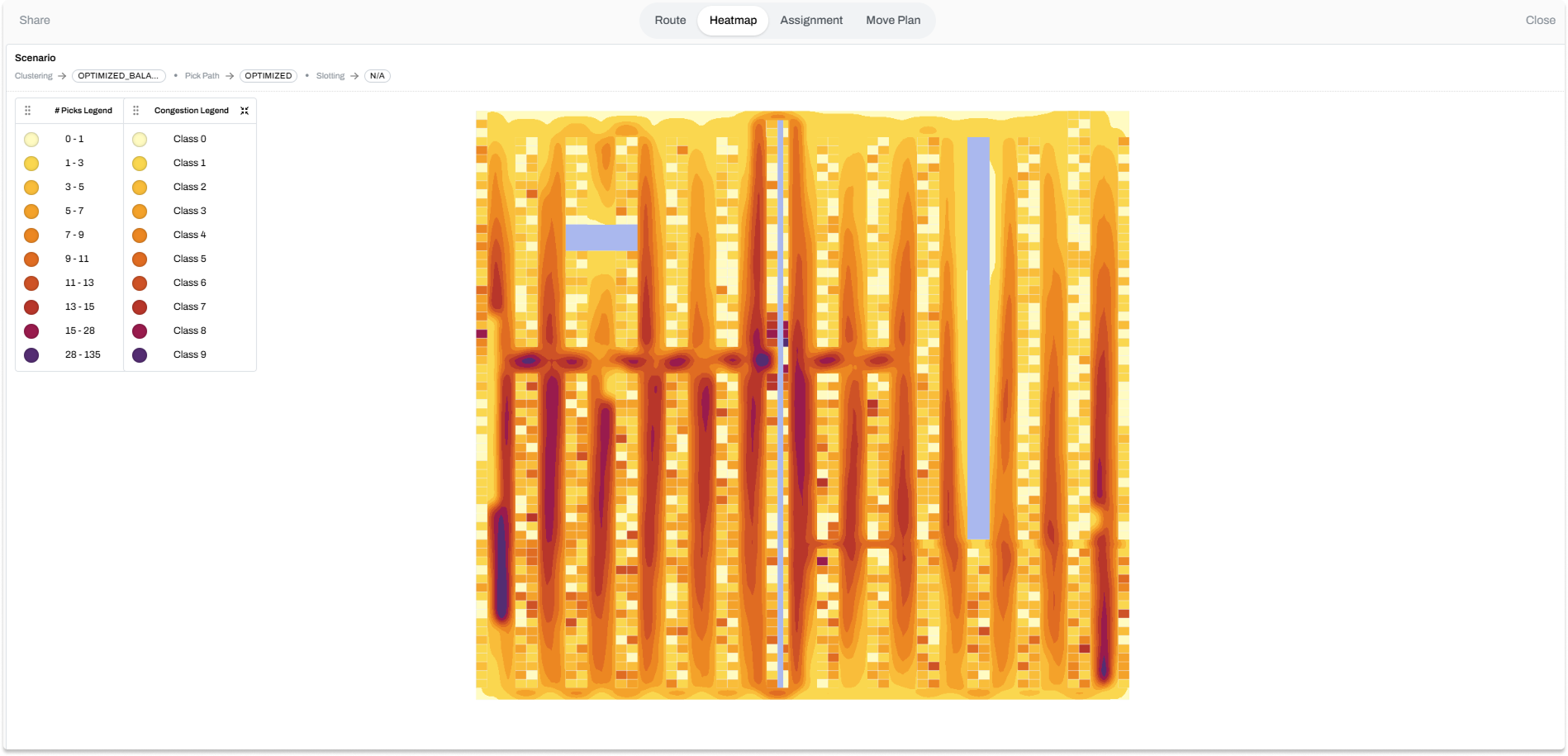
Once you know the gap, plan the move sequence: which zones reslot first and which SKUs move where. This plan becomes your daily roadmap for the next 2-6 weeks.
Step 2: Identify Temporary Storage Space
Rolling reslots need a staging area.
When you move Product A from Aisle 3 to Aisle 5, Product B temporarily sits in a holding zone until its turn arrives.
You need room for 10-15% of your active inventory for 1-2 days at a time.
Without it, pickers can't find products and operations slow anyway.
Step 3: Communicate the Schedule to Your Team
Your pickers will see changes every shift. Run a 20-minute meeting before Day 1 — show them the heatmap of current walking distances versus the target.
Communicate daily.
Step 4: Execute Phase-by-Phase (Daily or Per Shift)
Your reslotting plan breaks into daily or shift-based phases.
For each phase: pull inventory count for that product set, move products from old to new locations, update WMS locations immediately (same day), and audit a sample.
Never fall behind on WMS updates — if the system still shows the old location, pickers get lost.
Step 5: Monitor and Adjust in Real Time
As phases roll out, watch your KPIs.
Walking distance per pick should trend down. Accuracy should stay flat. If walking distance isn't improving, you may have sequenced zones poorly — adjust the next phase accordingly.
Rolling reslots let you course-correct without stopping everything.
Step 6: Validate and Baseline New Performance
When all phases complete, run a full performance audit.
Compare walking distance, pick rate, accuracy, and congestion to pre-reslot baselines.
Typical results: walk time drops 18-28%, pick throughput increases 8-15%. Document these numbers — they justify the effort and help you plan the next reslot in 3-12 months when demand shifts again.
Common Reslotting Mistakes (And How to Avoid Them)
Mistake 1: Reslotting Without a Heatmap
You move products based on guesswork or feel.
Product A seems popular, so it moves to the front — but your data shows Product B gets twice as many picks. Fix: Generate a heatmap of picking velocity by location before finalizing the new slotting plan. Shows you the real bottlenecks.
Mistake 2: Forgetting to Update the WMS
Products move to new locations, but the system still points to old ones.
Pickers search three aisles for an item that should be in one spot. Fix: Update locations in real time, same shift as the move. Run a 10-minute audit per phase to catch errors before the next shift starts.
Mistake 3: Not Planning for Compliance
Some SKUs carry restrictions.
Flammable items require appropriate storage proximity and fire suppression coverage. Temperature-sensitive products can't sit in warm zones. Hazmat can't share space with food. Moving products without checking constraints creates regulatory gaps and safety risks.↗ Fix: Document all product constraints — temperature, flammability, allergen risk — before planning new slotting. Build constraints into the plan from day one.
Mistake 4: Overwhelming Your Team
If your team doesn't understand why products are moving or where they're going, morale drops and errors climb.
Fix: Clear communication every shift. Show the heatmap to your team. Celebrate progress as walking distances improve week over week.
Mistake 5: Running Out of Staging Space
You move Phase 1 products, but Phase 2 isn't ready yet.
Temporary inventory piles up with nowhere to go. Pickers can't access aisles. Operations slow down anyway. Fix: Verify temporary storage before Day 1. Keep a clear timeline so phases flow without backups.
What Great Reslotting Looks Like
Your team reslots systematically.
Pickers see product location changes in a logical order, not random chaos. The WMS stays current, so "where is this?" questions disappear. Walking distances drop every week. By week 4, they've stabilized at a new, lower baseline.
You run the same reslot again in 12 months when demand shifts.
The process is smooth because you learned from the first one. According to warehousing industry benchmarks, a well-executed rolling reslot typically delivers walk time reductions of 18-28% and throughput gains of 8-15% within the first two weeks of stabilized operations.
This is what happens when you plan, communicate, and execute carefully.
Speed Up Reslotting With AI-Driven Planning
Rolling reslots are smart, but planning them requires data.
Which SKU should move where?
What's the impact of moving Product A from Aisle 3 to Aisle 5?
Can you batch moves to minimize disturbance?
Pulse lets you model different slotting strategies before executing any move. You see heatmaps of walking distance for each scenario. You test seasonal changes 30 days early.
You run what-if scenarios: "What if we move top 50 SKUs closer to packing?"
This visibility turns reslotting from a guess-and-check process into a measured, optimized operation. Fewer mistakes. Faster results. Lower risk.
Questions?
There is no industry standard. Guidance runs from twice a year to continuous. A common pattern is twice a year, once before peak season to promote seasonal fast movers to prime locations and once after peak to normalize back to standard velocity patterns. Fast-moving or high-SKU-count operations often go quarterly, or run re-slotting continuously as a capped list of moves at the end of each shift. The practical trigger is your own velocity distribution: when the top 20% of SKUs account for a meaningfully different share of total picks than they did at your last re-slot, it is time to re-evaluate your slot assignments.
Rolling reslots take 2-6 weeks depending on warehouse size and complexity. A 50,000 sq ft warehouse with 100+ active SKUs typically runs 3-4 weeks using the rolling approach. Big bang reslots compress the timeline to 1-3 days, but require operational downtime or significantly reduced capacity during that window. For most warehouses with 5+ pickers or mixed SKU profiles, the rolling method is faster in net terms because operations continue at full speed throughout.
Yes. Rolling reslots are designed to happen shift by shift while operations continue. Pickers may see temporary location changes each day, but throughput stays at normal levels. The key is real-time WMS updates and clear team communication before each shift. Big bang reslots require downtime or minimal capacity for 1-3 days. For warehouses that cannot afford a shutdown, the rolling method is the standard approach.
A rolling reslot moves products in phases over 2-6 weeks, zone by zone or category by category, while the warehouse continues operating at full capacity. A big bang reslot moves everything at once over 1-3 days and typically requires a full or partial shutdown. Rolling reslots cost less in labor and operational risk — if one phase goes wrong, you fix it before the next begins. Big bang reslots are faster to complete but more disruptive, with higher risk of coordination failures and team turnover during the shutdown period.
Five mistakes account for most failed reslots: (1) reslotting without a velocity heatmap, so moves are based on guesswork rather than actual pick frequency; (2) not updating WMS locations immediately after each move, causing pickers to search the wrong aisles; (3) ignoring compliance constraints like flammability, temperature sensitivity, or allergen separation, which creates safety and regulatory gaps; (4) poor team communication, which drops morale and increases errors when pickers don’t understand why locations are changing; and (5) running out of temporary staging space, which causes phase backups and slows operations anyway. Planning for all five before Day 1 eliminates most reslotting problems.
No. Reslotting reorganizes products within your existing warehouse layout. You are not redesigning shelves, buying new racks, or investing in hardware. The main requirements are temporary staging space (typically 10-15% of your active inventory area for 1-2 days per phase) and strong team communication throughout the process. The investment is in planning and coordination, not capital expenditure.
Compare before-and-after KPIs once all reslot phases are complete and operations have stabilized for 1-2 weeks. The primary metrics are: walking distance per pick (target: 15-30% reduction), pick throughput (target: 8-15% increase), order accuracy (should stay flat or improve), and congestion heatmaps from your WMS or optimization tool. Measure after stabilization, not during the reslot itself, since temporary location changes during execution can skew the numbers. If walk time dropped and throughput improved without accuracy declining, the reslot worked.