


What Is Warehouse Optimization Software?
Warehouse optimization software (WOS) is a category of tools that use algorithms, AI, and simulation to make warehouse operations more efficient.
Where a WMS manages the flow of goods (what's in stock, what needs to ship, which task goes to which worker), a WOS takes that same data and figures out the best way to execute it.
The simplest way to think about it: your WMS knows what needs to happen. Warehouse optimization software figures out how it should happen, in the smartest way possible.
That means
- calculating pick routes that minimize walking.
- Selecting box sizes that eliminate wasted space.
- Building pallet stacks that maximize trailer fill and avoid damage.
- Slotting fast movers close to the dock.
Each of these is an optimization problem, and each one compounds. Fix picking, and packing gets easier. Fix slotting, and picking gets faster. Fix cartonization, and transport costs drop.
A WOS doesn't replace your WMS. It connects to it through an API, takes in operational data, applies optimization logic, and sends the result back. Your WMS still runs the warehouse. The WOS makes it run smarter.
What WOS Is Not: The WMS Confusion
The most common misconception is that warehouse optimization software is just another name for a WMS. It isn't.
They solve different problems.
A WMS is a system of record. It manages inventory levels, tracks locations, creates pick lists, handles receiving and shipping, and keeps your operation moving.
Think of it as the operating system of your warehouse. SAP EWM, Manhattan, Blue Yonder, Korber, Mecalux. Every operation needs one, and most already have one.
The problem is that most WMS platforms were not built to optimize. They were built to manage.
When a WMS generates a pick list, it typically assigns items in order number sequence or FIFO. It doesn't calculate whether grouping orders differently would cut walk time by 30%.
When packing, the WMS records which box was used. It doesn't calculate which box should have been used to minimize shipping volume. The distinction matters.
WOS layers on top.
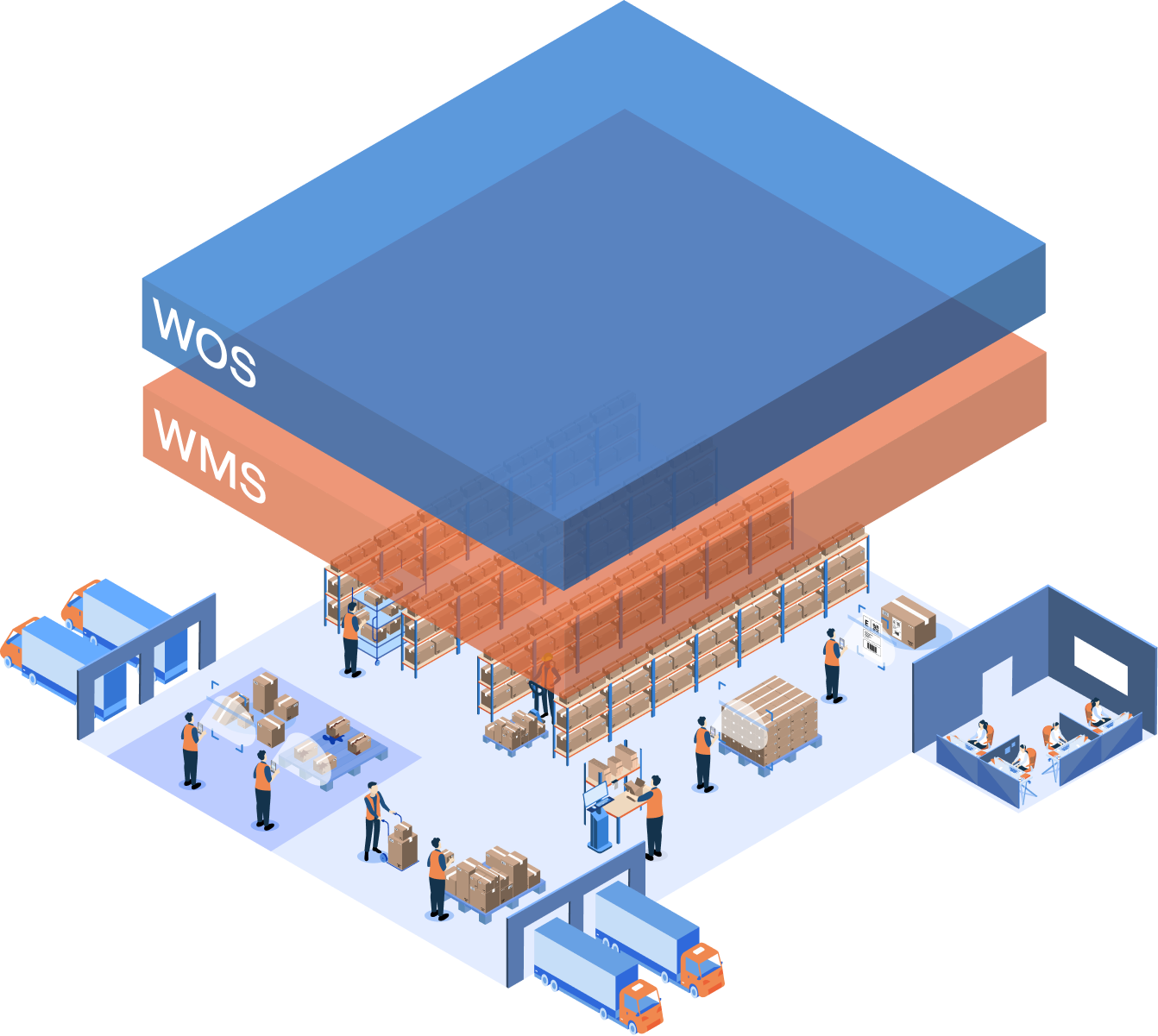
The WMS provides the data (orders, inventory, SKU dimensions, warehouse layout). The WOS runs its algorithms and returns the optimized result: a better pick route, a smarter box selection, an improved slot assignment.
Then the WMS executes it. The two systems work together through an API, each doing what it does best.
This is why swapping your WMS is not the answer when your picking is slow or your pallets are unstable.
The intelligence layer is what's missing, not the management layer. And adding that intelligence doesn't require replacing anything. It requires plugging in the right optimization module on top of what you already have.
The Core Components of Warehouse Optimization Software
Not every warehouse needs every module. That's the point of WOS: it's modular. You pick the components that address your specific bottleneck. Here are the ones that matter most.
1. Picking Optimization
This is where most operations start, because picking accounts for the largest share of warehouse labor.
A picking optimization module takes your order pool, groups orders into smart batches, and calculates the most efficient route through the warehouse for each picker.
The result: less walking, more picking. In practice, this means 20 to 50% shorter walk distances and 15 to 20% fewer FTEs needed for the same volume. For a warehouse running 30+ pickers across two shifts, that's a measurable headcount reduction without changing the physical layout or the WMS.
Pulse's picking module goes further by connecting pick optimization to slotting. Where a SKU sits and the route a picker walks are solved as one problem rather than one after the other. Cartonization and pallet building run on the same platform, as their own workflows on the same order and inventory data.
2. Cartonization
Every time a packer picks a box that's too big, you're shipping air.
Multiply that across thousands of shipments per day and the wasted volume adds up fast in freight costs.
Cartonization software solves this by calculating the optimal box size and item arrangement for every order before packing starts. The algorithm considers item dimensions, weight limits, fragility, and your available box range. Result: 15 to 30% less shipping air, lower dimensional weight charges, and fewer damaged goods from items rattling around in oversized boxes.
For operations running pick-to-box workflows, cartonization also tells the picker which box to grab at the start of the route. No more guessing at the packing station.
3. Pallet Stacking
Unstable pallets cause damage. Poorly built pallets waste trailer space. Both cost money. Pallet stacking optimization calculates the best way to build each pallet, accounting for item weight, crush resistance, stacking compatibility, and height limits.
For outbound operations, this means accurate pallet count estimation at order capture. Before a single item is picked, you know exactly how many pallets the order will need. That feeds directly into carrier bookings and transport cost quotes. No more guessing, no more surprise freight charges, no more overflowing staging areas.
Pulse supports both layer-based and tower-based stacking, with 2D visual instructions for operators on the floor. When inventory is short or orders change after confirmation, the stacking plan re-optimizes automatically.
4. Slotting Optimization
Slotting decides where every SKU lives in your warehouse. Get it right, and pickers walk shorter distances, replenishment is less frequent, and the warehouse handles peak volumes without expanding. Get it wrong, and your fastest movers end up in the back corner.
Slotting optimization analyzes order history, velocity data, and product characteristics to recommend the best slot assignment for every SKU. It shows you heatmaps of current pick activity, identifies zones where travel time is highest, and lets you run what-if scenarios to test changes before you move a single product.
Seasonal re-slotting is where this gets especially useful. Before peak season, you simulate the expected order mix against your current layout and adjust slots proactively. The alternative is discovering on Black Friday that your top sellers are slotted for last quarter's demand pattern.
5. Mobile Data Capture and Dimensioning
Optimization only works if the input data is accurate. If your SKU dimensions are wrong, cartonization picks the wrong box. If product weights are estimated, pallet stacking calculations are off. If inspection data is captured on paper and photos are shared via WhatsApp, there's no usable audit trail.
Flux is the mobile data capture side of the equation. It replaces clipboards, manual measuring, and scattered photo documentation with structured mobile workflows. Capture SKU dimensions on a phone in 3 to 5 seconds.
Run cargo inspections with AI that reads container numbers and labels automatically. Build 5S audit checklists that generate reports on submission. Handle returns with guided decision flows.
Static dimensioners cost 20,000 to 50,000 euros per station and are fixed in place. Flux works on Zebra handhelds, iPad Pro, and iPhone Pro models your team probably already has. Over time, the dimensional data Flux captures feeds directly into Pulse's optimization engine, improving cartonization and stacking accuracy.
6. Digital Twin and Simulation
The best warehouse optimization software doesn't just improve daily execution. It gives you a virtual copy of your warehouse where you can test changes before committing to them.
A digital twin takes your real warehouse layout, inventory, order patterns, and operational rules and creates a simulation environment. Want to know what happens if you add a mezzanine? Move zone boundaries?
Increase batch sizes? Re-slot for a new product mix? Run the scenario in the digital twin first. See the impact on walk times, throughput, and pallet counts before touching anything physical.
This is where WOS moves from operational tool to strategic tool. It's not just making today's picks faster. It's helping you plan what the warehouse should look like next quarter.
Why WOS Matters: The "Layer on Top" Advantage
The biggest practical advantage of warehouse optimization software is that it doesn't require you to rip and replace anything.
Your WMS stays. Your hardware stays. Your processes stay. The WOS plugs in on top and adds intelligence where you need it most.
This matters for three reasons.
- First, it's modular. A company struggling with picking productivity doesn't need to buy a cartonization module on day one. Start with picking optimization, prove the ROI, and expand to packing or slotting later. Each module works independently.
Each one also works better alongside the others. Picking and slotting are solved together, and the packing modules read the same order and inventory data, so you avoid the trap of local optimums where you improve one step at the expense of another.
- Second, it's fast to deploy. Because WOS connects to your WMS via API rather than replacing it, implementation timelines are measured in weeks, not months. There's no data migration, no retraining your entire floor on a new system, no parallel-run period where both systems compete. The WMS keeps running. The WOS feeds it better instructions.
- Third, it fills specific gaps. Maybe your WMS is strong on inventory management but weak on route optimization. Maybe your 3PL client requires pallet count estimation at order entry and your WMS can't do it.
Maybe your packing station relies on operator judgment for box selection and you're shipping 25% air. In each case, the solution isn't a new WMS. It's adding the specific intelligence module that addresses the gap.
Think of it like adding apps to a phone. The operating system (your WMS) handles the basics. The apps (WOS modules) add specific capabilities you need. You don't replace the phone every time you need a new feature.
What to Look for When Evaluating WOS
The warehouse optimization software category is growing. More vendors are entering, and some WMS providers are bolting on basic optimization features. Here's how to evaluate what's actually useful versus what's marketing.
Does it work with your WMS?
Any WOS worth considering should integrate with your existing WMS via API.
If a vendor requires you to switch WMS or use their proprietary management layer, that's a different product category entirely. The whole point of optimization software is that it layers on top of what you have.
Can you start small?
Modular deployment matters.
Can you pilot one module on a single operation before committing to a platform deal? Can you test with your actual order data before signing? If the vendor can't show you results on your own data, the risk of misaligned expectations is higher.
Does it optimize across functions or in silos?
Picking optimization alone is useful.
But if the pick sequence doesn't account for how items will be packed or palletized, you're sub-optimizing. Look for tools that connect picking, packing, and stacking so that the pick route already reflects the packing plan and the pallet build sequence.
Avoid siloed point solutions that optimize one step at the expense of another.
Is there a simulation layer?
Operational optimization (making today's orders faster) is the baseline.
Strategic simulation (testing changes before implementing them) is what separates the good tools from the great ones. Heatmaps, what-if scenarios, and digital twin capabilities give you a way to plan improvements rather than just react to problems.
How fast can you see results?
A tool that requires six months of integration before you can test a pick route is too slow for most operations. Look for self-service options: upload data, run a simulation, see the output. If the vendor can only show you a slide deck, keep looking.
Optioryx: Warehouse Optimization Software Built for Ops Teams
Optioryx provides warehouse optimization software through two products that work together or independently: Pulse for AI-powered warehouse optimization and Flux for mobile data capture.
Pulse: The Optimization Engine
Pulse handles the core optimization functions: picking, cartonization, pallet stacking, and slotting. It connects to any WMS via API, takes in order and inventory data, and returns optimized execution plans.
What sets Pulse apart is the combined optimization. Most tools optimize picking and slotting in isolation. Pulse solves them as one problem: slot placement is calculated against the pick routes it will produce. Cartonization and pallet building run on the same platform, on the same order and inventory data.
Slotting decisions account for how orders get picked, not just velocity data in isolation. This avoids the local optimum trap where fixing one step creates a problem in the next.
Pulse also includes a digital twin with what-if simulation. Upload your warehouse layout, run your order history through it, and see where the bottlenecks are before changing anything on the floor. Test new slotting strategies, batch sizes, zone configurations, and peak-season layouts in the simulation first.
Key stats: 20 to 50% reduction in walking distances, 15 to 30% less shipping air through cartonization, accurate pallet count at order capture. Pulse lets you upload data and run simulations without any WMS integration. Once proven, API integration connects it to your live operation.
Flux: The Data Capture Layer
Flux is a no-code mobile data gathering platform. It handles everything on the data capture side: dimensioning, cargo inspection, compliance checks, audit workflows, returns handling, and document scanning.
The flow builder is drag-and-drop. A supervisor can build a complete inspection workflow in under an hour. Workers follow guided steps on their mobile device. Data is structured from the point of capture, so there's no re-entry step. AI modules read barcodes, labels, container numbers, and hazmat symbols automatically.
For dimensioning specifically, Flux turns a standard mobile device into a dimension capture tool. Measure a carton in 3 to 5 seconds. The data feeds directly into Pulse for cartonization and stacking calculations, closing the loop between data quality and optimization accuracy.
Flux has a free tier. No hardware required. Most teams start with one use case, validate the results, and expand from there.
Who Is It For?
Optioryx is built for warehouse teams and operations managers in e-commerce fulfillment, retail distribution, wholesale, and 3PL. The sweet spot is operations with 10+ picker FTEs where walking distances, pack accuracy, and pallet quality directly affect labor costs and transport spend. Trusted by teams at GXO, Maersk, TD SYNNEX, Honda, Bleckmann, CEVA, and others.
Getting Started
If your WMS handles the basics well but you're still seeing long pick routes, too many pallets per shipment, inconsistent packing, or paper-based inspection processes, the answer probably isn't a WMS upgrade.
It's adding the optimization layer on top.
Questions?
Warehouse Optimization Software (WOS) goes beyond the basics of a Warehouse Management System (WMS) by using advanced algorithms, data, and simulations to make warehouse operations like picking, slotting, and packing more efficient.
Warehouse Management Systems (WMS) are used to organize and control the daily work inside a warehouse or distribution center. Their main job is to track when inventory arrives and leaves, where it’s stored, and how to keep things running smoothly. In contrast, Warehouse Optimization Software (WOS) sits on top of a WMS making operations more efficient. It uses advanced optimization modules and data to improve the entire warehouse operation flow. WOS doesn’t replace a WMS but works with it to help warehouses run faster, smarter, and at lower cost.
Pulse is a warehouse optimization layer that improves how WMS tasks are executed in picking, packing, and slotting. AI-Powered algorithms cut travel by 20–50%, increase box and pallet fill rates by 10–30%, deliver data-driven slotting moves, and reduce overall labor and transport costs.