


Summary
A dimensioning system measures the length, width and height of an item, parcel or pallet and sends the numbers to your WMS, TMS or shipping software, usually with a weight. The six dimensioning systems compared here are Flux, Cubiscan, vMeasure, MobileDemand xDIM, FreightSnap and Qboid. Fixed units suit one busy scan point. Mobile systems measure the goods where they are; Flux does it on an iPhone Pro or iPad Pro with LiDAR and records photos and barcodes in the same scan.
Many warehouses start looking for a dimensioning system after something specific goes wrong: carrier rebills pile up, or a WMS or cartonization project stalls because item dimensions are missing. That trigger decides which system fits, because the products below were built for different jobs. A pallet unit over a dock door does nothing for thousands of SKUs that still need measuring in the racking, and a parcel station cannot take a pallet.
The vendor facts come from each vendor's own product pages as they read on 13 October 2026. Where a vendor page does not state a fact, the table says so.
What is a dimensioning system, and which types exist?
A dimensioning system captures the outer size of an object and links it to a barcode, order or SKU. The sensor can be infrared, ultrasonic, laser, a 3D camera or the LiDAR scanner in a phone. Most systems also take a weight, from a built-in scale or one they connect to. For a buyer, where the measurement happens matters more than the sensor inside.
Carriers bill on these numbers. Parcel rates use dimensional weight, and FedEx rounds any fraction of an inch up to the next inch since 18 August 2025. LTL rates follow freight class, which now depends mainly on density. If your own numbers come up short, the carrier's remeasurement sets the bill.
Warehouse processes run on the same numbers. Slotting needs item sizes to match pick faces, cartonization needs them to choose a box, and pallet building and load planning need them to know what fits. Seven warehouse processes depend on item dimensions, from receiving to load building.
Three types of dimensioning systems
Fixed item and parcel stations measure whatever is placed on or passed under them. A countertop or floor unit holds the sensor above a measuring area, usually with a scale. They suit receiving benches and pack stations where every item passes one point, and in-line versions sit over a conveyor to measure parcels as they move.
Overhead freight units measure pallets at the dock. The sensor hangs above a spot where a forklift sets the pallet down, often over a floor scale. Nobody handles the freight during the measurement, which matters at a busy LTL terminal.
Mobile systems go to the item. They run on a rugged tablet with a depth camera, a purpose-built handheld, or an app on a phone with a LiDAR sensor, and they measure pallets in a lane, stock in the racking and items too big to carry to a station.
What a mobile dimensioner is and how it works has its own explainer, and the choice between a tape, a fixed station and a mobile device is set out in our comparison of manual, static and mobile dimensioning.
Dimensioning systems compared side by side
Two rows in the table rule out most options on their own: pallets and hardware to buy. If you ship LTL freight, the system has to measure pallets. If your team already carries iPhones or iPads, a system that needs its own device is one more thing to buy, charge and maintain. The other rows decide between what is left.
| Feature | Flux | Cubiscan | vMeasure | xDIM | FreightSnap | Qboid |
|---|---|---|---|---|---|---|
| Type | iPhone or iPad app | Fixed and overhead units | Fixed station, iPhone app | Rugged tablet app | Fixed units and apps | Purpose-built handheld |
| Hardware to buy | None on supported iPhone or iPad | Station or overhead unit | Station or iPhone 15 Pro | T1175 xTablet | Station, overhead unit or FreightTape | M2 Perceptor handheld |
| Pallets | Yes | Yes (1200, S9) | App, up to 100 cm high | Yes | Yes (FS 5000) | Yes |
| Weight | Reads scale display | Scale on item stations | Bluetooth scale | Bluetooth scale or display photo | Scale on parcel unit | Not stated |
| Beyond size and weight | Photos, barcodes, AI label reading, checklists | Barcode, photos (some models) | Photos, custom fields, barcode | Barcode scanner support | Photos, image station | Built-in barcode scanner |
Vendor product pages, read 13 October 2026. xDIM is MobileDemand's.
Scroll the table sideways to see all six systems.
Flux and the vMeasure app both measure on an off-the-shelf iPhone, and they differ in scope. The vMeasure app records dimensions, photos and custom fields, and needs an iPhone 15 Pro or newer. Flux makes the measurement one step in a flow you build, next to barcodes, label text, weight and checklists, and runs on iPhone 13 Pro or newer Pro models and iPad Pro 2020 or newer.
The six dimensioning systems, one by one
Flux
Flux is a mobile dimensioning app on hardware many teams already carry: iPhone 13 Pro or a newer Pro model, or iPad Pro 2020 or newer, all with a LiDAR sensor. It has separate modes for boxes, irregular items such as bags and bottles, oversized items and pallets. For pallets, a preset such as the EUR pallet fills in the 80 x 120 cm base, so the operator only captures the height.
The measurement is one step in a flow your team builds without code. The same scan can add a barcode, photos, label text read by AI, a weight read off a scale display and checklist answers. Each record keeps the photos taken during the scan, so a dimension can be checked later against what was on the floor.
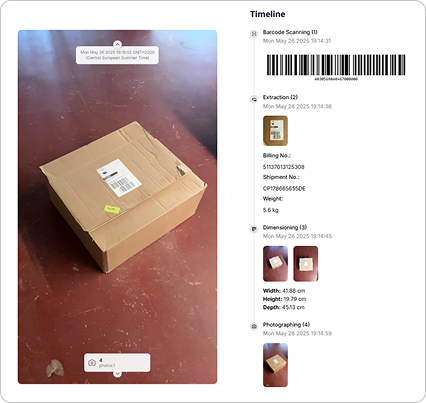
BME moved to Flux after its static dimensioner stood unused. In BME's customer story, "the static dimensioner was gathering dust in the warehouse"; BME now measures items at inbound and uses the data for slotting, picking, packing and shipment cost calculations. TD SYNNEX, with over 15,000 active products, used Flux to improve master data quality as part of a WMS upgrade for automation.
The dimensioning module needs one of the supported LiDAR devices, which rules out older iPhones, non-Pro models and Android phones. Barcode scanning, photos and checklists run on any iOS or Android device.
Cubiscan
Cubiscan is the best-known name in fixed dimensioning, and it sells a whole range of units. The Cubiscan 325 is aimed at item master data, the 75 Pro at small parcels and the 210-L at automated lines. For LTL pallets there are the Cubiscan 1200 and S9, plus Contour Pro for pallet inspection.
Every Cubiscan unit measures at a fixed point, so the goods come to it. That works at a receiving bench or dock door with a steady flow. Stock already in the racking, or freight spread over several docks, needs another approach. The trade-offs per model are in Cubiscan alternatives: 5 options and when each one fits.
vMeasure
vMeasure sells a fixed station and a phone app. The Parcel Ultima Pro mounts on a table, cart or conveyor, measures parcels and irregular items. The mobile app runs on iPhone 15 Pro and later Pro models and measures parcels up to 50 x 50 x 50 cm and pallets up to 200 x 200 x 100 cm.
The vMeasure app is built around the measurement. It adds up to six photos and seven custom fields per scan, and takes barcodes and weight from Bluetooth scanners and scales. iPads and iPhones older than the 15 Pro are not listed as supported, and the 100 cm pallet height limit leaves out taller loads.
MobileDemand xDIM
xDIM runs on one device, MobileDemand's T1175 xTablet, a rugged Windows tablet with a depth camera. It measures boxes, pallets and irregular, flat, small and oversized items from about 0.4 inches to 8 feet.
Weight comes from a paired Bluetooth scale or from a photo of the scale display. A team that already carries iPhones or other handhelds would add the xTablet on top, since xDIM does not run on other hardware.
FreightSnap
FreightSnap is best known for the FS 5000, a pallet dimensioner hung above the dock. The range now also includes a parcel dimensioner with a scale for packages up to 48 inches, an in-motion parcel unit, an image station, FreightTape (a Bluetooth tape measure with an app) and a mobile app, FreightSnap 360.
The FS 5000 measures freight without anyone touching it, which fits an LTL terminal or a busy dock door where every pallet passes one spot, and only that spot. FreightSnap vs mobile dimensioning goes through when a fixed pallet unit is the better buy.
Qboid
Qboid's M2 Perceptor is a purpose-built handheld: an Android device with 3D and 2D image sensors and a built-in Zebra SE4100 barcode scanner, which returns a dimension result in 0.1 seconds. Qboid and its sensor partner Orbbec present it for parcels through to pallets. The pages we read publish no accuracy figure, and it is one more device type to charge and maintain.
Freight and pallet dimensioners: what to check
For LTL freight, the measurement now drives the class. The NMFTA made density the primary factor when evaluating freight in 2025, and density is weight divided by cubic feet. A pallet measured short on the bill of lading shows a higher density, and often a lower class, than the carrier finds when it remeasures. How to calculate freight class lists the 13 density bands.
Freight dimensioning systems come in two shapes. Overhead units such as the Cubiscan 1200 or FreightSnap FS 5000 measure each pallet as a forklift sets it under the sensor. Mobile systems measure the pallet where it stands: in a staging lane, at the dock door, or on the floor of the inbound area before it is wrapped. A US shipper uses Flux to keep proof of pallet dimensions.
Floor-stacked pallets are where a fixed unit cannot help. In Flux's stacked-pallet flow, the operator scans the pallet barcode, holds the device at the shortest side, and Flux picks up the footprint and the load height, uneven top boxes included. The operator then confirms the 3D box and adds a photo.
How much does a dimensioning system cost?
The purchase price is only part of what a dimensioning system costs. A fixed station needs floor space, power and a network point, and someone has to bring every item or pallet to it. When that walk gets long, operators skip it, which is how BME's dimensioner ended up gathering dust.
Time per item is the cost that comes back every shift. A UK retail 3PL working on its item master measured 20 items in 30 minutes with Flux, against 45 minutes with a tape measure: a 33% cut, across a population of 8,202 SKUs.
Flux plans scale by devices, flows and AI module calls, from Ripple for one device to Wave with unlimited devices. The details are on the Flux pricing page, and the trial gives seven days of free testing in your own warehouse.
How to choose a dimensioning system for your warehouse
Four questions narrow the six systems down to one or two, and the first one can rule out several options on its own.
- What do you measure, and where? Items at a receiving bench suit a fixed station, pallets through one dock door suit an overhead unit, and pallets in lanes or stock in the racking suit a mobile system.
- What else has to be captured at the same moment? If inbound also needs photos, barcodes, label data or a damage check, a measurement-only device adds a second step.
- Which devices does your team already carry? xDIM and Qboid bring their own hardware, the vMeasure app needs an iPhone 15 Pro or newer, and Flux runs on iPhone 13 Pro or newer Pro models and iPad Pro 2020 or newer.
- Where does the data have to go? Into a WMS, ERP or TMS through an API, or into a file export to start with.
Multi-site operations add one more question: will every site measure the same way? A fixed unit per site is a purchase per site. A mobile flow is published once and appears on every device in the field, so three warehouses record the same fields in the same order.
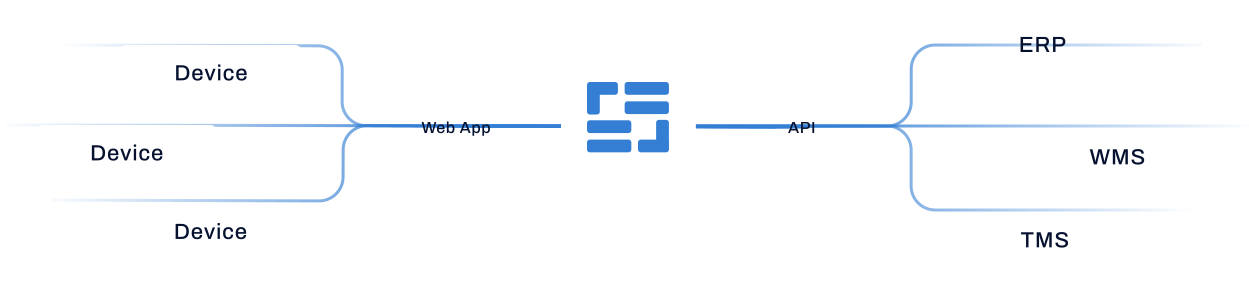
The data route decides how much work the rollout is. Flux starts with an Excel export from the web app and pushes records to a WMS, ERP or TMS through its API once you are ready to connect.
To see Flux measure a box, a pallet or an odd-shaped item before you try it, pick an object in the dimensioning videos, or read the Flux product sheet, a one-page summary of dimensioning, data capture and the AI modules.
Questions?
A dimensioning system measures the length, width and height of an item, parcel or pallet, usually with its weight, and sends the result to a WMS, TMS or shipping system. It can be a fixed station, an overhead unit at the dock, or a mobile device such as a rugged tablet, a handheld or a phone with a LiDAR sensor. Warehouses use the data for carrier billing, freight class, slotting, cartonization and load planning.
It depends on the type, and the purchase price is only part of it. A fixed station or overhead unit is bought per scan point and needs floor space, power and someone to bring the goods to it. Time per item adds up every shift: a UK retail 3PL measured 20 items in 30 minutes with Flux, against 45 minutes with a tape measure. Flux runs on an iPhone Pro or iPad Pro with LiDAR that the warehouse may already own, and comes with a 7-day free trial.
It depends on the system. Fixed stations and overhead units are the hardware, bought per scan point. xDIM runs on MobileDemand's T1175 xTablet and Qboid on its own M2 Perceptor handheld. The vMeasure app needs an iPhone 15 Pro or newer. Flux runs on iPhone 13 Pro or newer Pro models and iPad Pro 2020 or newer, so a team that already carries one needs no extra device.
For most master data and pallet work, yes, if the phone has a supported LiDAR sensor. Flux runs on iPhone 13 Pro or newer Pro models and iPad Pro 2020 or newer, and measures boxes, irregular items and pallets where they stand. A static unit is still the better choice for very high volumes through one fixed scan point.
For a dock where every pallet passes one spot, an overhead unit such as the FreightSnap FS 5000 or the Cubiscan 1200 fits. For pallets in staging lanes, floor stacks or across several sites, a mobile system measures them where they stand. Flux does this on an iPhone Pro or iPad Pro with LiDAR and adds the pallet barcode and a photo to each record.