


Summary
A dimensioner is a device that measures the length, width and height of an object, usually a carton, an item or a pallet, and records them as data. A mobile dimensioner does the same job on a phone or tablet: the operator points the device at the object, the LiDAR sensor reads its shape, and the app fits a 3D box around it and returns the three dimensions and the volume. A static dimensioner stays in one place and items are brought to it. A mobile dimensioner goes to the item, in the aisle, at the dock or at the packing table.
Every warehouse system that plans space or cost runs on item dimensions. The WMS uses them to choose a location, cartonization uses them to choose a box, the TMS uses them to quote freight, and the carrier uses them to bill you. When the dimensions are missing or wrong, each of those calculations is wrong too, and the cost of out-of-date item master data turns up in storage, labour and freight long after the measuring was skipped.
Carriers have also become stricter about size. From August 2025, UPS and FedEx round every fraction of an inch up to the next whole inch, so a carton recorded at 11.2 inches is billed at 12. A dimension that lives on a sticky note, or nowhere, gets billed on the carrier's numbers.
What is a dimensioner and what types are there?
A dimensioner measures an object's length, width and height automatically, and usually works out its volume. Most link the result to a barcode, and many work with a scale, so one scan gives the WMS both the size and the weight of an item. In the US, devices used to calculate "freight, storage, or postal charges based on the dimensions and/or volume occupied by the object" have their own section in NIST Handbook 44, the rulebook for commercial weighing and measuring devices.
Dimensioners differ in one thing above all: whether the item travels to the dimensioner or the dimensioner travels to the item. That decides where you can measure, how many items one unit can handle, and what it takes to add a second site.
| Type | How it measures | Where the item goes | Typical use |
|---|---|---|---|
| Tape measure | By hand, typed in later | Anywhere | Low volumes of uniform items |
| Static parcel dimensioner | Sensors over a fixed table, often with a scale | Brought to the station | Parcels and SKUs at packing or receiving |
| Pallet dimensioner | Overhead sensors, often over a floor scale | Driven under it by forklift | Pallets and freight at the dock |
| In-line dimensioner | Sensors over a conveyor, often with a scale and scanner | Passes on the conveyor | High-volume parcel sorting |
| Handheld dimensioner | Dedicated device with a depth camera | The device goes to the item | Measuring in the aisle or yard |
| Mobile dimensioner | LiDAR sensor in a phone or tablet, plus an app | The device goes to the item | Item master data, inbound, outbound checks, pallets |
View this comparison on desktop for the full data table.
Static parcel units, pallet frames and in-line systems are built for a fixed point in the flow, such as a pack station, a dock door or a sorter. Handheld and mobile dimensioners are built for work that moves. The comparison of manual, static and mobile dimensioning covers cost, speed and accuracy per type, and the guide to the best warehouse dimensioning systems compares named products. Apart from the tape measure, a mobile dimensioner is the only type that uses a device the warehouse may already own.
How does a mobile dimensioner work?
A mobile dimensioner uses the LiDAR sensor built into some phones and tablets. LiDAR measures the distance to each point in front of the camera with light, which gives the app a depth map of the scene. The app combines that depth map with the camera image to find the object, separate it from the floor or the table, and fit a 3D box around it.
On the floor, a measurement takes a few steps:
- The operator opens a flow on the device and scans the item's barcode, so the measurement is tied to the right SKU or shipment.
- They hold the device level above or beside the object and tap. A 3D box appears over the live camera image.
- If the box does not sit right, they resize it with two fingers or drag one face. A manager can switch manual edits off for a flow.
- They accept, and the app records length, width, height and volume, with photos of the object taken during the scan.
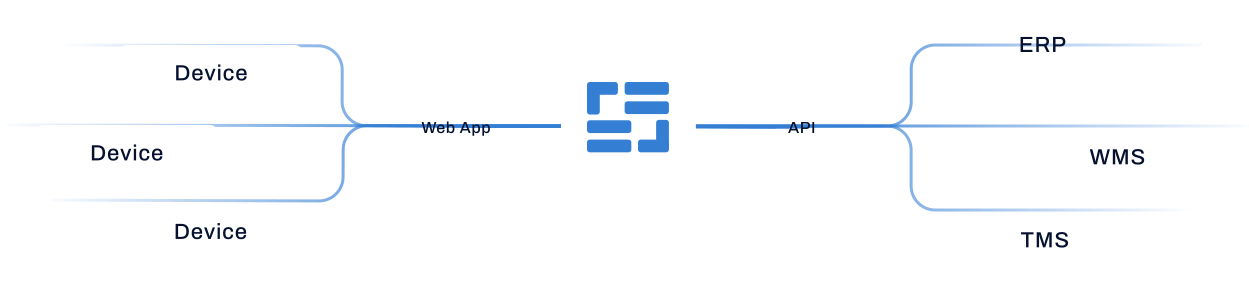
- The record syncs to the web app, where it can be exported or sent on to the WMS, TMS or ERP.
The measurement is one step in a flow that can hold several. In Flux, the mobile dimensioner by Optioryx, the same scan can also read text from a label, take photos of the item's condition, read the weight off a scale display or ask a checklist question. A manager builds the flow in the web app without code, and it appears on the operators' devices once published.
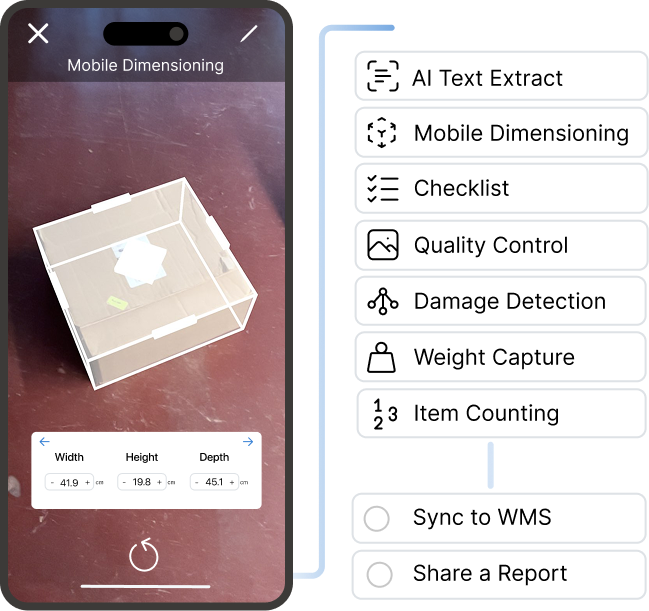
The device you need is set by the sensor. Flux measures on iPhone 13 Pro or newer Pro models and on iPad Pro 2020 or newer. Non-Pro iPhones have no LiDAR sensor and cannot run the dimensioning step, although they can run the other steps in a flow, such as barcode scanning, photos and checklists, as can Android devices.
Once a measurement is accepted, nobody types it in again. Records from every device land in one web app, ready to export to Excel or to push to the WMS, TMS or ERP through the API. That removes the retyping step, which is where length and width get swapped and a decimal point goes missing.
What can a mobile dimensioner measure: boxes, irregular items and pallets
Each kind of object needs its own measuring method, because a carton, a bag of fittings and a stacked pallet do not have the same shape. Flux has four measuring modes, and the manager decides which of them the operators can use in a flow.
Boxes and cartons
Box mode takes a single tap, with the device held parallel to the top of the box. This is the fastest case, and the one most item master projects start with. One UK retail 3PL measured 20 items in 30 minutes with Flux, against 45 minutes for the same 20 with a tape measure, across a population of 8,202 SKUs. That is a third less time for the same 20 items.
Irregular and oversized items
Bags, bottles and soft or rounded packs get irregular mode. The app fits the smallest box that wraps the whole item, which is the space it takes up in a carton, on a shelf or in a truck. Large or tall items, such as furniture or machine parts, use oversized mode: the operator taps from several angles while walking around the object.
Pallets
Pallet mode captures a stacked pallet from at least two sides, so the full load height and any overhang are included. With a pallet preset, such as the EUR pallet at 120 x 80 cm, the base is filled in and only the height is measured. For a stacked pallet on the floor, the operator scans the pallet barcode, holds the device at the shortest side and confirms the footprint and height, and the knowledge base article on measuring a stacked pallet on the floor lists each step. A US shipper uses Flux to keep proof of pallet dimensions.
The same device measures unit load devices, the air cargo containers that are too large and too irregular for most fixed dimensioners. Parcels, irregular items, pallets and ULDs all run on one phone or tablet, so a site does not need one unit per size band. The guide to mobile pallet dimensioning goes deeper on pallets, and short clips of each object type, from a box to a pallet, are on the mobile dimensioning videos page.
Where warehouses use a mobile dimensioner
Most teams start with the item master. New SKUs arrive at inbound without dimensions, or with supplier data nobody has checked. Measuring them at receiving, before they go to a location, lets the WMS slot them on real sizes and gives cartonization and load planning numbers they can trust.
At outbound, the dimensions decide what a shipment costs. UPS calculates dimensional weight as length x width x height divided by a divisor, and notes that "The divisor varies by rate type: 139 for Daily Rates; 166 for Retail Rates." A carton measured and recorded before it leaves lets you check the carrier's invoice against your own numbers, and the carrier oversize fees playbook lists the size and weight thresholds behind the most common surcharges. What happens when the numbers are off is covered in the consequences of incorrect freight measurements.
Validation is the third use: measuring SKUs that already have dimensions in the WMS and flagging the ones that are wrong. A mobile dimensioner can do this at the rack, so stock does not travel to a measuring station and back. BME replaced a static dimensioner with Flux because operators would not walk items to the fixed station, and the unit was gathering dust.
Van Moer Logistics uses Flux to capture master data, and the team says the process is running more efficiently. Dimensioning is often where Flux starts, and steps such as label reading at inbound or photo proof of condition at outbound can be added to the same flow later.
The same device works outside the warehouse, wherever an object needs a quick size check. An airline can use it to check cabin baggage at the gate, and a field team can measure cargo in a yard or a container. The flow can add photos and a barcode scan, so the record shows what was measured, by whom and when.
How accurate is a mobile dimensioner?
Accuracy depends on the object, the distance and how the device is held, more than on the app alone. LiDAR depth readings get less precise with distance, so a pallet measured from two metres away comes out less exact than a carton measured from about 25 cm above its top. These habits make the biggest difference on the floor:
- Walk closer before accepting. Standing more than two metres away reduces accuracy, especially on pallets.
- Keep the device level and steady when you tap. A tilted device gives a skewed box.
- Get the whole object in the frame. Any part that is cut off makes the box too small.
- Watch for glass, shiny plastic and metal, which confuse the sensor. Dark, matte surfaces measure best.
A phone-based dimensioner such as Flux is not certified for trade use. Where measured dimensions are used to bill a customer, the device falls under weights and measures rules such as NIST Handbook 44, and certified hardware is the safe choice. For item master data, cartonization, slotting, load planning and invoice checks, the question is whether a measurement puts the item in the right box, location or rate band, and carriers round up to the next whole inch anyway.
Test it on your own items before you decide. Measure 20 SKUs you know well with a tape and with the phone, include the awkward ones, and compare the two lists. A free trial of Flux is enough for that test.
Mobile or static dimensioner: which one fits your operation?
A static dimensioner fits when certified accuracy, or a very high volume through one point, is the requirement. A parcel hub that bills by dimensional weight, or a conveyor that measures every carton on the way to the sorter, needs fixed, certified hardware.
A mobile dimensioner fits when the items are spread out or the volume is moderate. It goes to the item, it covers boxes, irregular items and pallets on one device, and a new site needs a supported phone instead of an installation. It also captures barcodes, photos and weight in the same scan, which a station built only to measure does not do.
If you are replacing a static unit, the overview of Cubiscan alternatives compares static, in-line, handheld and phone-based options and says when a Cubiscan is still the better buy. For a quick look at the difference on the floor, see manual and mobile dimensioning side by side.
The quickest way to find out is a small pilot on one process. Pick receiving of new SKUs, or the outbound check on your largest cartons, run it on a supported iPhone or iPad for a week, and compare the records with what the WMS held before.
Questions?
A dimensioner measures the length, width and height of cartons, items or pallets, often with weight, and records them against a barcode. Warehouses use the data to slot items, choose cartons and plan loads. Shippers use it to calculate dimensional weight and check carrier invoices.
Yes, if it has a LiDAR sensor and runs a dimensioning app. Flux by Optioryx measures boxes, irregular items and pallets on iPhone 13 Pro or newer Pro models and on iPad Pro 2020 or newer. Non-Pro iPhones have no LiDAR sensor and cannot be used for dimensioning.
As a rule, no. In the US, devices used to calculate freight, storage or postal charges from dimensions fall under NIST Handbook 44 and need certification, which phone-based dimensioners such as Flux do not have. A mobile dimensioner fits item master data, packing, load planning and invoice checks; billing customers by measured size calls for certified hardware.
A static dimensioner is fixed in place, and items are brought to it on a table, under an overhead frame or along a conveyor. A mobile dimensioner is a phone, tablet or handheld that goes to the item, so it can measure stock in the rack, at the dock or in the yard. Static units suit high volumes through one point; mobile units suit spread-out work and several sites.
Yes. Anywhere an object needs a quick size check, a phone with LiDAR can measure it, for example cabin baggage at an airport gate, cargo in a container or parts in a yard. The same flow can add photos and a barcode scan, so the record shows what was measured and when.