












Right pallet count at order entry.
Build them on the floor.
Use as standalone webapp without integration, or plug into your WMS or ERP.
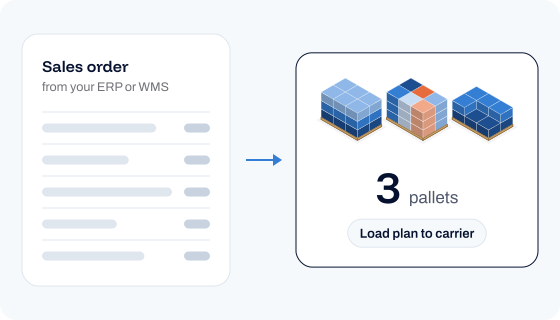
Accurate pallet counts at order entry
Calculate the pallet count and pallet configuration when a sales order is created. Give your customer the right shipment cost and book the right truck capacity.
2D step-by-step packing guidance
Shows where every case goes. Combine with pick-to-pallet for mixed-case pallet building, where pickers follow the shortest route in a sequence that creates the optimal pallet.
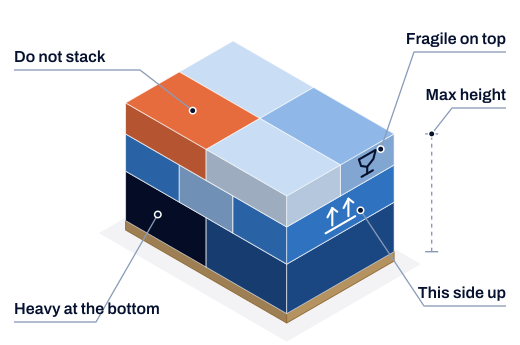
Follow stacking and handling rules
Apply weight, height, orientation and do-not-stack rules during pallet building. Prevent product damage and avoid surcharge fees. Rules people or robots can follow.
Pallet stacking patterns configured to your item profile

Layer mode
Flat layers, each one turned so the cases interlock.

Tower mode
Items stacked in towers, column by column.

Multi-height items
Different case heights across the stack and on top.
Keep your existing
WMS or ERP system
Works alongside your existing systems, through a secure and flexible API.
.png)
Tell us how you build pallets currently
Let's first get to know your pallet building process. Then we show what value Pulse can add, and how.
Questions?
Not a sign up trial. You get a demo of the modules you picked, then a business case built on your own data, then a pilot in one warehouse measured against your own baseline.
Yes, Pulse can link picking and packing into a single workflow, for both pick-to-box and pick-to-pallet tasks, by providing packing instructions that account for packing constraints and the optimal picking sequence.
There are 3. Manual file import and export, flat files over CSV or SFTP, or a direct API connection to your WMS, TMS or ERP.
Any of them. Pulse exposes its optimization through an API, so it connects to whatever you already run.