Summary
Cluster picking is a picking method in which one picker collects several customer orders in one tour, with a separate tote or box for each order on the cart. The picker puts every item straight into its order's container, so the orders reach packing already sorted. It suits small orders of a few lines that share aisles, as in e-commerce and B2C fulfillment. How far each tour walks depends on two things the warehouse management system (WMS) decides: which orders share a cart, and the route the cart takes.
Many warehouses that pick small orders by hand run some form of cluster picking, even when they call it something else: a trolley with a row of crates, a pick list for six or eight orders, and a scanner that says which crate gets the item. The method is easy to start and easy to run below its potential, because the rules that fill each cart are usually set once in the WMS and rarely changed.
Order picking is the costliest job in most warehouses. A 2023 study in the journal Logistics puts it at up to 55% of a warehouse's total operating costs, so the way carts are filled shows up directly in labor cost.
Batch picking, the closest relative, sorts the orders after the tour instead of on the cart. Our article on cluster vs batch picking compares the two in detail.
What is cluster picking in a warehouse?
Cluster picking is a form of multi-order picking. One picker collects the items for several orders in one tour and keeps them apart on the cart from the first pick. Each order has its own position on the cart, holding a tote, crate or shipping box. At every location, the pick list or scanner shows how many units to take and which positions they go to.
The group of orders on one cart is the cluster, and the WMS builds it before the tour starts. In Microsoft's documentation for Dynamics 365, the number of positions in a cluster is the number of orders on it, which also makes it the number of totes on the cart.
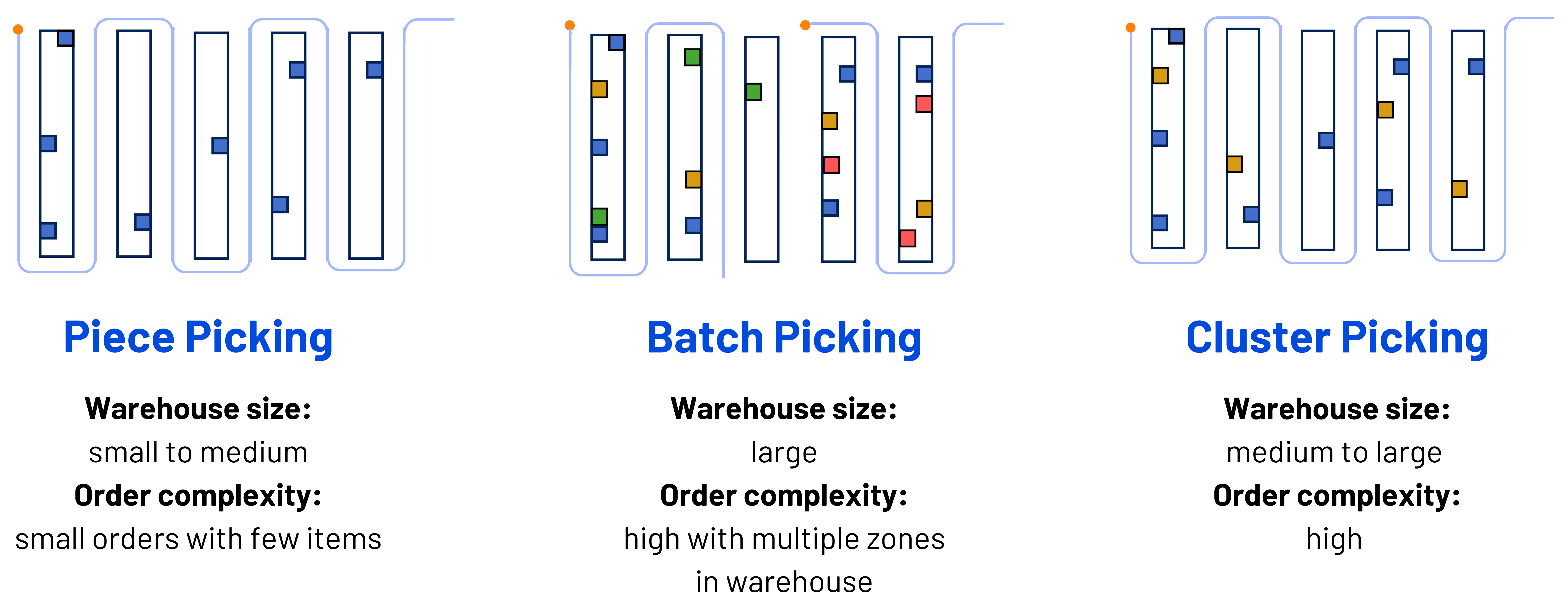
The terms get mixed up. Some WMS vendors and glossaries use cluster picking and batch picking for the same thing. The practical difference is where the orders are separated: on the cart during the pick in cluster picking, and at a sort step after the tour in batch picking.
Cluster picking terms
| Term | What it means on the floor |
|---|---|
| Cluster | The set of orders assigned to one cart for one tour |
| Position | A numbered place on the cart that holds one order |
| Tote or box | The container in a position. In a box-first setup it is the shipping carton itself |
| Cart or trolley | The shelved cart that carries the positions through the aisles |
| Put confirmation | The scan or button press that confirms an item went into the right position |
| Cluster size | The number of orders per cart, set in the WMS and limited by the cart |
View this table on desktop for the full list of cluster picking terms.
Cluster picking is one of three ways to pick several orders at once, next to batch picking and zone-batch picking. Multi-order picking explains all three, and the guide to warehouse picking strategies covers the other methods, from wave to case picking.
How cluster picking works, step by step
A cluster picking tour follows the same six steps in most warehouses, whether the picker works from paper, an RF scanner or lights on the cart. The first two steps are planning, and they decide most of the walking.
- The WMS releases a group of orders to the floor, in a wave or as orders come in.
- The WMS, or an optimization layer on top of it, splits the orders into clusters, one per cart, within the cart's limits.
- The picker sets up the cart: an empty tote or box goes into each position, and a scan links each container to its order.
- The picker walks the route on the pick list and, at each location, takes the total quantity needed for all orders on the cart.
- The scanner or the cart lights show how many units go into which position. The picker puts them in and confirms each put.
- After the last location, the cart goes to packing or shipping with every order already in its own container.
An example with one cart
Say a cart has 12 positions and the WMS releases 12 small online orders. The picker scans 12 empty totes onto the cart and starts the route. At a location that holds an item for orders 3 and 9, the picker takes two units and puts one in each tote. The 12 orders share one walk through the aisles, where single-order picking would need twelve.
Why the choice of orders matters
Two carts with 12 orders and the same number of lines can walk very different distances. Orders whose items sit in the same aisles share their walk, while orders spread over the building pull the cart into every aisle. The diagram below, from our picking optimization page, shows three carts before and after their orders are regrouped by location.
Before: the picks of three carts (tours A, B and C) are spread over the whole floor. After: the same orders regrouped by location, so each cart works one section. Diagram from the Optioryx picking optimization page.
The route is the second lever. A pick list sorted by location number walks the cart down the full length of each aisle, even where a cross-aisle would cut the trip short, and a good cluster on a poor route gives back part of its gain.
Cluster picking cart setup: how many orders fit on one cart?
The cart sets the ceiling for every tour. How many orders fit on one cart depends on its positions, the size of the containers and the weight it can carry, and the cluster size in the WMS has to match. The Logistics study states the general rule: "The maximum number of stops a picker can make during the same tour depends on the capacity of the picking vehicle."
Positions and tote size
Each position holds one order, so the number of positions is the hard limit. Tote size is the soft one. A tote sized for a three-line order overflows when a ten-line order lands in it, and the picker then needs a second tote or a second trip. The tote size should follow the order profile: the units and volume of a typical order, and how often an order goes over that.
Weight and cart size
A cart also has a weight limit, and heavy items in a top-shelf tote make the cart harder to push and the tote harder to lift at packing. Weight and volume belong in the cluster rules next to the order count. Cart width is a floor question as well: a cart with more positions saves more walking per order, but two wide carts may not pass each other in a narrow aisle.
Box-first: picking straight into the shipping box
Some sites skip the tote and put the shipping box in the position. The items go straight into the carton they ship in, and packing comes down to closing and labeling it. The box for each order has to be chosen before the tour starts, which only works with accurate item dimensions and a packing calculation behind it.
Scanner, paper or lights
The put is where cluster picking goes wrong: an item meant for tote 1 lands in tote 7, and two customers get the wrong parcel. Paper lists leave the check to the picker. An RF scanner can ask for a tote scan after every put, and put-to-light carts show a light and a quantity at the right position, with a button to confirm. A confirmation at every put catches the wrong tote before the order ships.
When does cluster picking fit, and when does it not?
Cluster picking pays off when orders are small compared with the cart and share aisles with each other. That describes most e-commerce, B2C and small B2B fulfillment, where a typical order has a few lines of small items picked by hand from shelving.
Signs it fits your orders
- Most orders fit in one tote.
- The same aisles appear in many orders, so carts share stops.
- Pickers walk the floor with carts or trolleys, and walking takes a large part of their shift.
- Orders ship as parcels, so a sort step after the tour would add handling.
When another method fits better
Orders that fill a tote or a cart on their own gain little from sharing a tour, and single-order picking is simpler for them. Single-line orders of a few fast movers often suit batch picking, where one combined pick per SKU and a quick sort can beat many separate puts. Pick areas too large for one tour point to zone picking, and cluster carts can still run inside each zone. Fully automated goods-to-person sites have no carts to fill.
Limits to plan for
The cart caps the saving. Once every position is in use, the next order needs another tour, so the walk saved per order levels off at the size of the cart. Every put is also a chance for a wrong tote, which is why confirmation matters more here than in single-order picking.
Restrictions narrow the choice. Separate carts per carrier, per cut-off time or per customer type all reduce the orders that may travel together, and the fewer orders a cluster can choose from, the less walking it can share.
How a WMS builds clusters, and where walking is lost
Most WMS platforms offer cluster picking as a standard picking method. What they set up is a fixed rule for filling the cart. Microsoft's guide to setting up cluster picking in Dynamics 365 describes cluster profiles that set "the number of positions to use, when to break clusters, and how to sequence and verify the picking work."
In Microsoft's documented example of system-directed cluster picking, the work is sorted first by priority and then by work ID, and the first pieces of work in that order take the positions on the cart. The rule does not check whether those orders share aisles. Rules that fill carts by order number, arrival time or due date have the same blind spot.
The route follows the same logic. A pick list sorted by location number takes the picker through the aisles in a fixed snake pattern, and Microsoft's guide warns that changing the sort order "can lead to a suboptimal picking route". A sort order has no view of distances, cross-aisles or one-way aisles unless someone builds them into the location numbers. The diagram from our picking optimization page draws the difference on one floor.
The same picks on two routes: a fixed snake path (orange, dashed) that runs the full length of every aisle, and the shortest path (blue) that uses the cross-aisle. Diagram from the Optioryx picking optimization page.
Signs your clusters walk more than they need to
- Several carts in the same wave visit the same far aisle for one or two lines each.
- Tours with the same number of orders differ widely in length.
- Carts leave with empty positions because the rule ran out of matching work.
- Experienced pickers reorder the pick list because they know a shorter way.
- Nobody can say how far a tour walks, only how many lines it picked.
Filling the cart and routing it depend on each other. Which orders belong together depends on the route they would share, and the best route depends on which orders are on the cart. Add positions, weight, cut-off times and priorities, and one wave has far more possible clusters than any fixed rule can compare.
How to improve cluster picking on top of your WMS
Better cluster picking needs no new carts and no new WMS. The gain sits in the rules that fill each cart and the route each cart walks, and both run on data the WMS already holds: order lines, locations and the layout of the floor.
Give the rules the cart's real limits
Positions, tote volume, weight and cut-off times are the limits a cluster has to respect. Written into the rules as numbers, they let the system fill each cart as far as it can go, instead of stopping at a fixed order count.
Cluster and route together
Grouping starts from where the lines sit, so that orders sharing aisles share a cart, and each cart then gets its own shortest route. That second step is pick path optimization. Solving the two together finds clusters that are short to walk, which neither step finds on its own.
At Bleckmann, a fashion and apparel 3PL, Optioryx software works alongside the existing WMS and generates a route for each pick list. Bleckmann reported an average of 15 to 20% less walking compared with non-optimized routes.
When items often ordered together sit far apart, no cluster makes their walk short. Fast movers near the start of the route and related items close together shorten every tour, which is the work of warehouse slotting.
Test new rules on last month's orders
Cluster rules can be tested before the floor sees them, by replaying past orders on a digital twin of the warehouse. The replay shows the walking per tour under the old rules and the new ones, on your own orders and layout.
Pulse: clustering and routing on top of the WMS
Optioryx Pulse is an optimization layer that does this on top of the WMS. It groups orders into cart-sized clusters and routes them together, within the limits a site sets: orders, picks, handling units, volume, weight and distance per tour, plus due times. The WMS keeps releasing work and directing pickers, and Pulse returns which orders go on which cart and in what sequence.
Pulse connects through an API, flat files over SFTP, or connectors such as the one for SAP EWM. It can also run first on uploaded order history, so the gain is visible on your own data before any integration. Across customer deployments, Pulse delivers up to a 30% increase in pick rate. The AI picking overview sums up the approach on one page, and the picking ROI calculator turns four inputs into a first estimate of the yearly saving.
A MedTech distribution center: 15%, then 27%
A distribution center in the MedTech industry picks 30,000 order lines a day, all by hand, with a team of 60 operators. It works box-first: every pick is tied to a handling unit, the shipping box, before the round starts. Before Pulse, operators chose in the WMS which orders to combine, and the pick sequence followed a general Z-shaped snake route.
Pulse now fills each trolley so that orders sharing aisles travel together and one route covers them all. The first measured result was a 15% increase in picking productivity, worth up to 9 FTE in manual picking. Six weeks later, with route optimization and double-stacked trolleys added, productivity was 27% above the level before any optimization.
For the operators there was almost no change at go-live, because the trolleys reached them already planned. The MedTech customer story has the details, and the site's team explains the project in the video below.
Not every site gains as much. Where the pick area is compact, orders already fill a cart or travel is a small part of picking time, the bottleneck usually sits elsewhere, for example in replenishment or in the confirmation steps.
Questions?
Cluster picking is a picking method in which one picker collects several customer orders in one tour, with a separate tote or box for each order on the cart. The picker puts each item straight into its order's container, so the orders reach packing already sorted. It suits small orders of a few lines, such as e-commerce and B2C orders.
Both methods pick several orders in one tour. Cluster picking keeps the orders apart on the cart during the pick, with one tote per order. Batch picking takes the combined quantity for all orders into one container and sorts the items by order after the tour, at a table, a put wall or a sorter.
As many as the cart has positions, provided the orders fit the totes and the cart stays within its weight limit. The cluster size in the WMS should match the cart. For walking distance, which orders share a cart matters more than how many: orders whose items sit in the same aisles share most of their route.
A cart or trolley with numbered positions, a tote or shipping box for each position, and a way to confirm each put, such as an RF scanner or a put-to-light cart. A paper list works too, but leaves the check to the picker. The WMS needs cluster picking set up as a picking method, which most WMS platforms offer.
Yes. An optimization layer such as Optioryx Pulse decides which orders go on each cart and the route each cart walks, and hands that back to the WMS to run. The WMS keeps releasing orders and directing the pickers. A MedTech distribution center increased picking productivity by 27% this way, with route optimization and double-stacked trolleys added.